


Chatbot Storyboarding: The Secret to Winning AI Bot UX
Estimated reading time: 8-10 minutes
Key Takeaways
- Chatbot storyboarding is crucial for designing engaging and intuitive chatbot user experiences.
- It's a visual planning process that maps out conversation flows, helping identify issues early.
- The process involves defining goals, identifying users, mapping intents, sketching flows, annotating emotions, wireframing, and iterating.
- Incorporating conversational UI patterns, user flow mapping, personality design, engaging dialogues, and proper tone of voice is vital.
- Small details like microinteractions, a smooth onboarding experience, and optimal response timing significantly enhance UX.
Table of contents
- Chatbot Storyboarding: The Secret to Winning AI Bot UX
- Key Takeaways
- Introduction: The Foundation of Engaging Chatbot UX
- Understanding Chatbot Storyboarding: The Why and How
- The Chatbot Storyboarding Process: Step-by-Step
- Conversational UI Patterns: Essential for Bot Design
- AI Bot User Flow Mapping: Visualizing the Experience
- Chatbot Personality Design: Bringing Bots to Life
- Engaging AI Dialogues: Making Conversations Work
- AI Chatbot Tone of Voice: Setting the Mood
- Emotional Hooks in Chatbots: Connecting on a Human Level
- Microinteractions in Chatbots: Small Details, Big Impact
- Chatbot Onboarding Experience: Making a Great First Impression
- Chatbot Response Timing Best Practices: Speed and Rhythm
- Putting It All Together: Holistic Chatbot Design
- Conclusion: Storyboarding as the Key to User-Centric Chatbots
- References
- Frequently Asked Questions
Introduction: The Foundation of Engaging Chatbot UX
Building a friendly, trustworthy chatbot is not easy. Building a friendly, trustworthy chatbot Many chatbots confuse or frustrate users instead of helping them. What separates a chatbot that users love from one they abandon? The answer is user experience (UX). At the heart of great chatbot UX lies a powerful technique: chatbot storyboarding.
Chatbot storyboarding is more than a design trend. Originally used in film and animation, storyboarding is now essential in conversational design. It gives teams a way to visualize each moment of a chatbot’s conversation, helping them spot problems before development begins. Good chatbot storyboarding is how modern, user-first bots get built—bots that feel smooth, intuitive, and worth coming back to. bots that feel smooth, intuitive, and worth coming back to
Understanding Chatbot Storyboarding: The Why and How
What is Chatbot Storyboarding?
Chatbot storyboarding is a visual planning process for mapping how a chatbot interacts with users. Instead of just listing questions and answers, you draw or sketch the flow of conversations. Storyboarding simulates messy, off-script user journeys, not just straight lines
- Helps teams see each step of the conversation
- Spots logical flaws or dead ends early
- Predicts where users might get stuck or leave
- Enables early, low-cost testing and improvement
- Unites team members with a shared vision
Think of storyboarding as building a comic strip for your bot’s dialogue. This makes chatbot development more like editing a movie—cutting out awkward moments before an audience ever sees them. https://www.chat360.io/blog/how-to-design-a-chatbot
Why Is Storyboarding Essential?
By drawing out chat flows, storyboarding:
- Reveals confusing directions and flow gaps
- Reduces mistakes that cost time later
- Lets teams collect feedback from real users and stakeholders before coding starts
Most importantly, it makes chatbots feel more “human” and less robotic by planning emotional tone and timing into the conversation. Storyboarding is the missing link between a bot that just “works” and one people enjoy using.
The Chatbot Storyboarding Process: Step-by-Step
Step 1: Define Goals & Objectives
- Pinpoint the main purpose of the chatbot
- Clarify business outcomes and user needs the chatbot must solve
- Example: Is your bot answering FAQs, or guiding users through a booking?
Setting clear goals roots your storyboard in reality. https://www.interaction-design.org/literature/article/ux-storyboards
Step 2: Identify Key Users & Create Personas
- Design user personas using research, not guesses
- Include their typical needs, behaviors, frustrations, and contexts
A well-built persona keeps the storyboard focused on real people.
Step 3: Map User Intents & Journeys
- List all user intents—what people want from the chatbot
- Draw user journeys, including possible branches, clarifications, and exit points
Show not just the “ideal” conversation, but detours and unexpected user behavior.
Step 4: Sketch Conversational Flows
- Use sticky notes, sketches, or digital tools to plot out scenes
- Show dialogue as a series of frames or “panels,” including branches and feedback
This is where conversational UI patterns and chatbot user flow mapping come alive. https://standardbeagle.com/rethinking-conversational-ai-process/
Step 5: Annotate Emotional States
- Add notes for user emotions at each point—are they confused, relieved, annoyed?
- Highlight friction, delight, or moments when the bot needs to adapt tone
This humanizes your storyboard, reminding you UX is about emotions, not just actions. https://insightgridnews.com/emotional-chatbot-ai-future
Step 6: Wireframe Critical Exchanges
- Pair storyboards with dialogue samples, wireframes, or UI screenshots
- Preview microinteractions, onboarding messages, and error handling
Seeing these details makes your chatbot UX realistic and ready for development.
Step 7: Iterate and Gather Feedback
- Let team members and stakeholders review the storyboard
- Use their feedback to fill gaps, clarify flows, and ensure business and UX goals align
Storyboarding saves time and delivers clarity—before a single line of code. https://insightgridnews.com/chatbot-analytics-tool-guide
Conversational UI Patterns: Essential for Bot Design
Understanding Conversational UI Patterns
Conversational UI patterns are the templates and techniques that shape your chatbot’s user flow. Good patterns make dialogue smooth and help users achieve their goals quickly.
Key conversational UI patterns include:
- Prompt-response: Bot asks, user answers (e.g., “How can I help you today?”)
- Quick replies: Pre-set buttons for common responses (“Book,” “Cancel,” “Edit”)
- Guided conversations: Bot leads users through forms or menus, step by step
- Error recovery: Bot gracefully handles mistakes or unclear input (“Sorry, I didn’t understand that. Do you mean X?”)
- Confirmation and feedback: Bot confirms received data (“You want to schedule a call at 2 PM, right?”)
These conversational UI patterns help:
- Reduce user confusion
- Make the chatbot more forgiving to mistakes
- Smooth out tricky or complex interactions
Synonyms: dialogue structure, conversation blueprint, interactive sequence
AI Bot User Flow Mapping: Visualizing the Experience
The Power of User Flow Mapping
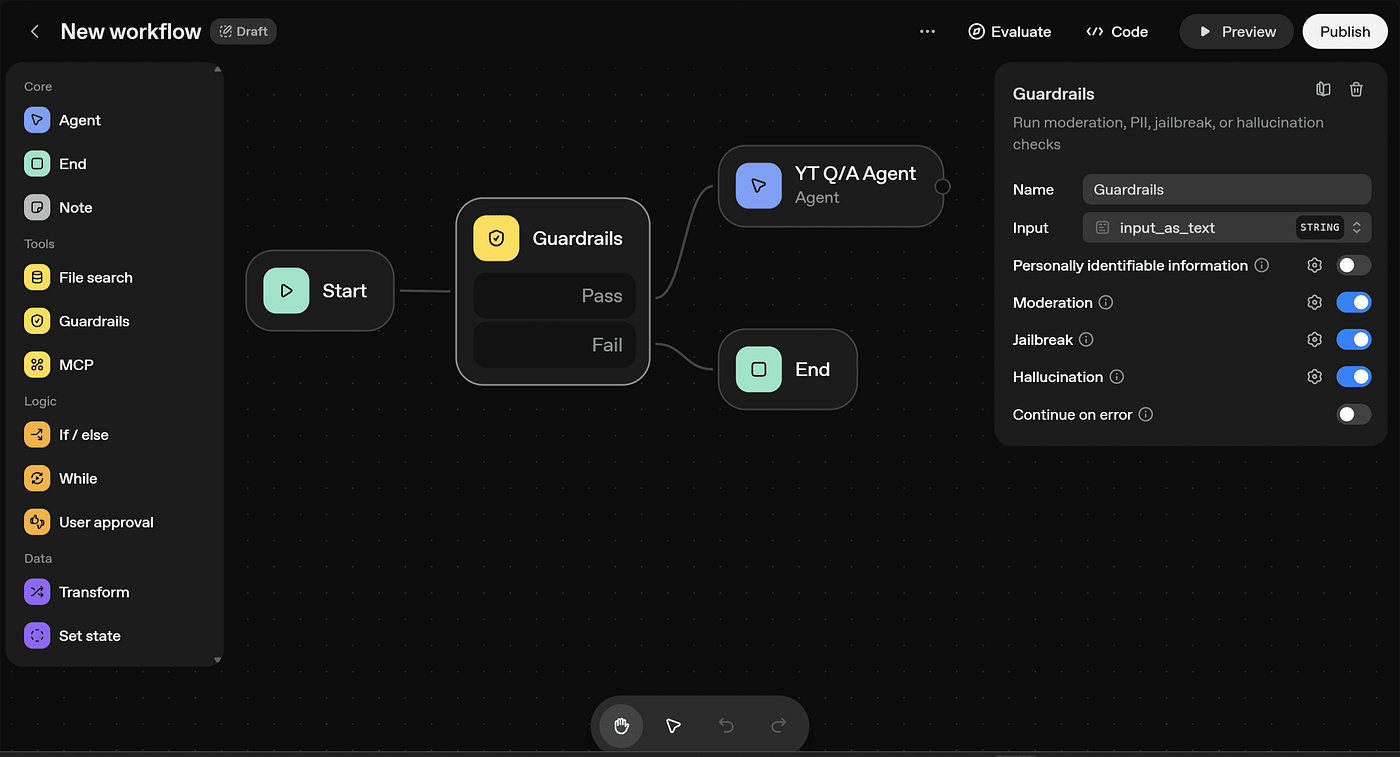
AI bot user flow mapping is about drawing the decision tree of how a user moves through a chatbot conversation. It’s one of the most critical parts of successful chatbot storyboarding.
Benefits include:
- Predicts and eliminates dead ends
- Optimizes for the shortest number of steps to common goals
- Highlights spots where users might get lost or give up
- Surfaces paths for clarification or escalation to humans
Mapping user flow is like having a map before building roads—smart, efficient, and necessary for quality interaction.
LSI Keywords: journey mapping, conversational paths, flow diagram
Chatbot Personality Design: Bringing Bots to Life
Why Personality Matters
Chatbot personality design gives your bot a character that users remember. Whether the bot is playful, formal, or empathetic, having a consistent personality makes conversations feel organic and trustworthy.
Tips for strong chatbot personality:
- Match the tone to your brand and audience (fun for a kids’ site, formal for a bank)
- Define signature phrases, unique greetings, or ways of expressing emotion
- Keep it consistent—don’t switch styles mid-conversation
Adding personality humanizes your AI, making it more relatable and enjoyable.
Synonyms: character design, voice persona, conversational style
Engaging AI Dialogues: Making Conversations Work
Tips for Writing Engaging Dialogue
To keep users attentive and satisfied, chatbot dialogue needs to be:
- Clear: Use simple language; avoid technical jargon
- Concise: Keep answers short and to the point
- Interactive: Ask questions and give choices
- Positive: Use friendly, encouraging language
Examples:
- Bad: “Input source not recognized, error code 101.”
- Good: “Oops! I didn’t catch that. Want to try again or ask for help?”
LSI Keywords: conversational design, interactive script, user engagement
Great dialogue builds confidence and encourages people to ask more questions, improving UX.
AI Chatbot Tone of Voice: Setting the Mood
The Importance of Tone
AI chatbot tone of voice shapes how users feel about your bot. The wrong tone can make an AI seem rude or unhelpful. The right tone makes it feel warm, clever, or even funny.
Guidelines for choosing chatbot tone:
- Match tone to context (serious for emergencies, informal for fun products)
- Use positive, polite phrasing (“Let’s find that for you!” vs. “Wait.”)
- Consistency is king—don’t swap styles in the same session
Related terms: voice design, conversational tone, linguistic style
Emotional Hooks in Chatbots: Connecting on a Human Level
Using Emotional Hooks
Emotional hooks grab attention and build empathy. Chatbots that recognize and respond to feelings create stickier, more effective conversations.
Ways to build in emotional intelligence:
- Annotate storyboards with expected emotions at each step
- Use empathetic responses (“I’m here to help if you’re stuck!”)
- Offer encouragement after mistakes (“No problem, let’s try again.”)
- Respond thoughtfully to frustration or confusion
Examples of emotional hooks:
- Saying “That sounds frustrating. Want to talk to a real person?” when a user is stuck
- Using friendly emojis or playful language where appropriate
Synonyms: emotional engagement, affective computing, empathy-driven dialogue https://standardbeagle.com/rethinking-conversational-ai-process/
Microinteractions in Chatbots: Small Details, Big Impact
What are Microinteractions?
Microinteractions are tiny moments that make a chatbot feel alive—quick animations, “typing” indicators, or confirmation chimes.
In chatbot UX, microinteractions can be:
- A “typing…” animation to show the bot is working
- “Got it!” confirmations after each user input
- Playful reactions to certain words, like a wink emoji for jokes
Benefits:
- Keep users patient during delays
- Show progress and reduce confusion
- Add character without being overwhelming
Examples include progress bars, notification sounds, or animated avatars—all making the UX more enjoyable.
Keywords: subtle feedback, interactive cues, conversational micro-moments
Chatbot Onboarding Experience: Making a Great First Impression
Why Onboarding Matters
A smooth chatbot onboarding experience welcomes users and reduces drop-off rates. It’s the first “scene” in your storyboarding plan.
Best practices:
- Begin with a friendly, clear greeting (“Hi! I’m Zoe, your support assistant.”)
- Set expectations right away (“I can help you with bookings, info, or account questions.”)
- Offer quick-start options and don’t overload with info
- Lead users gently—one small request at a time
A well-crafted onboarding flow increases user confidence and sets the tone for future conversations.
Synonyms: first-time user flow, introductory interaction, chatbot welcome
Chatbot Response Timing Best Practices: Speed and Rhythm
Optimizing Response Timing
Chatbot response timing is about how fast (or slow) a bot replies. Good timing keeps users relaxed and engaged; bad timing can make a bot annoying or seem “broken.”
Guidelines:
- Instant feedback is great for simple tasks (“On it!”), but too-quick replies can feel fake
- Use “typing…” or loading animations for tough tasks to mimic human pace
- Never leave users waiting without any visual cues—show that the bot is thinking or processing
Annotate your storyboard with timing notes:
- Quick responses for FAQs
- Pauses and delays for sensitive or complex answers
LSI Keywords: interaction timing, bot pacing, conversational latency
Putting It All Together: Holistic Chatbot Design
Storyboarding as the Glue
Everything—from microinteractions to error recovery—comes together in the storyboarding process. By visually mapping the entire chatbot journey, teams:
- Align on UX and business goals
- Spot and fix problems before they reach production
- Create a holistic, user-first experience instead of isolated features
Storyboarding isn’t just a UX tool. It’s a blueprint for smarter, kinder, and more connected chatbots.
Primary and LSI keywords: conversation design, storytelling, chatbot planning, dialogue mapping https://www.interaction-design.org/literature/article/ux-storyboards
Conclusion: Storyboarding as the Key to User-Centric Chatbots
To create chatbots that users love, chatbot storyboarding should be your first step. Storyboarding:
- Gives teams clarity, direction, and a concrete plan for improvement
- Anticipates user needs, questions, and emotions before launch
- Cuts down on costly fixes and rework later
- Raises chatbot UX from “just functional” to truly delightful
By applying methods like user flow mapping, conversational UI patterns, microinteractions, and emotional hooks—ALL visualized through careful storyboarding—your chatbot can truly shine.
Design teams that master chatbot storyboarding build AI bots that are intuitive, friendly, and genuinely helpful. Don’t wait until coding starts; pick up your pen, map the journey, and make your chatbot something people want to talk to—again and again. https://arounda.agency/blog/storyboarding-in-ux-visualizing-user-journeys https://www.interaction-design.org/literature/article/ux-storyboards
References
- Standard Beagle: Rethinking Conversational AI Process
- Arounda: Storyboarding in UX
- Interaction Design Foundation: UX Storyboards
- Chat360: How to Design a Chatbot
- Meegle: Storyboarding for AI Projects
Frequently Asked Questions
Chatbot storyboarding is a visual planning process for mapping how a chatbot interacts with users, sketching out conversation flows and potential user journeys rather than just listing questions and answers.
Storyboarding is essential because it helps teams visualize each step of a conversation, identify logical flaws or dead ends early, predict user struggles, enables low-cost testing, and ensures a shared vision, making chatbots feel more human and intuitive.
Conversational UI patterns are templates and techniques that structure a chatbot’s user flow, such as prompt-response, quick replies, guided conversations, error recovery, and confirmation messages, all designed to make dialogue smooth and efficient.
Chatbot personality design gives the bot a consistent character (e.g., playful, formal, empathetic), making conversations feel more organic, trustworthy, relatable, and enjoyable, ultimately humanizing the AI.
Microinteractions are tiny, subtle moments in a chatbot's interface, like “typing…” indicators, “Got it!” confirmations, or playful reactions, that make the bot feel alive, keep users patient, show progress, and add character to the user experience.
By following these steps and centering your chatbot projects on careful storyboarding, you’ll be miles ahead in creating engaging, helpful, and truly user-centric bot experiences.
One thought on “Chatbot Storyboarding: The Secret to Winning AI Bot UX”
Comments are closed.