Smart AI CRM: Transforming Customer Relations
Key Takeaways
- CRM sync AI automates data integration between your CRM and other business tools.
- It significantly boosts efficiency, data accuracy, and saves valuable time by eliminating manual data entry.
- AI-powered features include automated data entry, email logging, pipeline updates via chatbots, and smart de-duplication.
- Leading CRMs like Zoho, HubSpot, and Monday.com are leveraging AI for smarter customer relationship management.
- Implementing CRM sync AI involves reviewing current data, defining use cases, and customizing automation rules for continuous improvement.
- AI *enhances* human roles in CRM, allowing teams to focus on strategy and customer relationships rather than repetitive tasks.
Table of contents
- Introduction: Meet CRM Sync AI—The Future of Automated Integration
- 1. Overview of CRM Sync AI
- 2. The Importance of AI in CRM Systems
- 3. Common CRM Integration Issues and How CRM Sync AI Fixes Them
- 4. Deep Dive into AI-Powered CRM Features
- 5. Case Study: Zoho CRM Integration with AI
- 6. Case Study: Monday.com CRM AI Bot and HubSpot Sales Pipeline AI
- 7. Implementing AI in Existing CRM Systems
- 8. FAQs: CRM Sync AI
- 9. Conclusion: The Value of CRM Sync AI
- 10. Call to Action: Level Up Your CRM—Start with AI Automation Today
- References
Introduction: Meet CRM Sync AI—The Future of Automated Integration
Every business wants to grow, but many run into the same roadblocks: scattered customer data, repetitive manual entries, and slow hand-offs that leave teams frustrated and customers waiting. If you’ve ever battled with duplicate contacts or messy pipeline stages, you’re not alone. The good news? CRM sync AI is changing the way organizations connect, share, and update their data. By using artificial intelligence to automate CRM integration, you can say goodbye to manual data headaches—and hello to more time for what matters most: building stronger relationships and closing more deals. CRM sync AI
In this post, we’ll show how CRM sync AI crushes integration issues, removes manual hand-offs, and lets modern teams thrive. We’ll look at how AI streamlines data entry, logs emails, updates pipelines automatically, cleans up contact lists, and makes CRM automation simple. Whether you use Zoho, Monday.com, HubSpot, or another platform, this guide shows you how AI-powered CRM integration delivers value, step by step.
1. Overview of CRM Sync AI
What is CRM Sync AI?
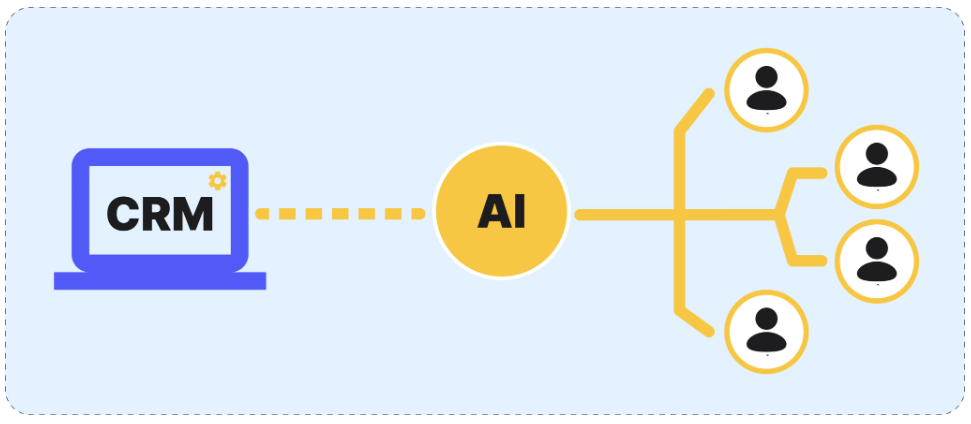
CRM sync AI uses artificial intelligence to connect, sync, and manage data between your customer relationship management (CRM) system and other business tools, such as email, chat, sales and marketing platforms, and project management apps.
How Does CRM Sync AI Work?
- AI learns from your business data and patterns to automate data entry and integration.
- It understands the context of each interaction or data point.
- Data moves automatically between tools—no more manual updates or copying and pasting.
- Real-time sync means everyone always sees the freshest, most accurate information.
Key Benefits of CRM Sync AI
- Increased efficiency: Data is entered and updated automatically.
- Better accuracy: AI reduces human mistakes in data entry.
- Time savings: Repetitive tasks are automated, freeing up your time.
- Higher data quality: Duplicates and errors are spotted and fixed on the fly.
- Scalable: Handles growing amounts of data and new integrations as you grow.
Key features enabled by CRM Sync AI:
- Automated CRM data entry: Syncs new leads, notes, and updates without manual work.
- Email to CRM logging: Matches and saves conversations instantly.
- Pipeline updating chatbot: AI bots update sales stages without team input.
- CRM automation rules: “If-this-then-that” logic runs automatically, triggered by real events.
Relevant Sources:
https://www.rolustech.com/blog/ai-crm-features-for-2025
https://technologyadvice.com/blog/information-technology/ai-crm/
2. The Importance of AI in CRM Systems
Why Implement AI in Your CRM?
Businesses adopting AI in CRM systems are seeing huge gains in productivity, customer service, and business growth. Here’s why:
Key Advantages:
- Boosted Speed: AI automation in CRM can process updates and syncs faster than any human.
- Fewer Errors: Software does the repetitive work so mistakes are almost eliminated.
- Improved Customer Experience: Data is always up to date, which means more personalized and timely responses.
- Predictive Insights: AI analyzes your historical customer data to spot trends and make recommendations.
- Reduced Burnout: Team members aren’t wasting hours on menial tasks—they’re focusing on closing deals or supporting customers.
How It Impacts Business:
- Sales reps save hours each week by not having to manually update the CRM.
- Managers get real-time pipeline data and can make decisions faster.
- Customers receive quick, accurate responses—leading to better satisfaction scores.
- Companies can quickly scale their operations without scaling manual work.
Related Sources:
https://www.rolustech.com/blog/ai-crm-features-for-2025
https://technologyadvice.com/blog/information-technology/ai-crm/
3. Common CRM Integration Issues and How CRM Sync AI Fixes Them
CRM Automation: Solving Pain Points with AI
Many organizations face common problems when using or integrating CRM systems:
- Fragmented data: Customer data is spread across emails, spreadsheets, and multiple software tools.
- Manual data entry: Staff spend hours copying notes, logging interactions, and creating duplicate records.
- Slow or missed pipeline updates: Information gets out of sync, creating forecasting errors or missed opportunities.
- Record duplication: Same contact appears multiple times, making tracking difficult.
- Integration headaches: Connecting CRM to other tools is complex and costly.
How CRM Sync AI Overcomes These Problems
- Automated data capture: Instantly logs new leads, updates, and interactions from all connected platforms.
- No more duplicate entry: AI recognizes and merges duplicate contacts and notes.
- Pipeline accuracy: Keeps sales stages and forecasts live and up-to-date.
- Frictionless integration: AI handles most of the “glue work” for you; minimal IT support needed.
- Enhanced data enrichment: Merges and fills gaps from multiple sources for a single customer view.
Example Use Cases:
- Automatically logging every customer email and linking it to the right deal.
- Syncing notes from chat apps or mobile sales visits into the CRM.
- Chatbot-driven pipeline stage updates triggered by real-time conversations.
Relevant Sources:
https://www.rolustech.com/blog/ai-crm-features-for-2025
https://technologyadvice.com/blog/information-technology/ai-crm/
https://www.harmonix.ai/en/blog/ai-crm
4. Deep Dive into AI-Powered CRM Features
AI CRM Data Entry—No More Manual Work
- AI can extract important details (such as names, emails, deal values) from emails, calls, and chat logs.
- Populates CRM fields instantly—reducing errors from copy-paste or missed updates.
AI Email to CRM Logging—Every Conversation Counts
- Links every email (inbox, sent, reply, forward) to the right record or pipeline stage.
- Tracks email engagement (opened, read, replied) seamlessly.
Pipeline Updates via Chatbot—Stay in Sync
- AI chatbots in your CRM or team chat (like Slack or Teams) can auto-update deal stages based on chat messages or meeting notes.
- Boosts real-time visibility for the whole team.
AI CRM Automation Rules—Set and Forget
- Use rules like “If email to VIP client is not answered in 3 hours, alert manager.”
- Triggers can include emails, missed calls, website visits, and more.
Smart Tagging & Contact De-Duplication
- AI tagging system: Instantly labels leads by industry, buyer intent, or engagement.
- Prevents contact duplication by recognizing repeated entries or similar names.
Enriching Data Automatically
- AI merges incoming data from multiple channels and fills gaps, so every contact is up to date and complete.
Related Sources:
https://www.rolustech.com/blog/ai-crm-features-for-2025
https://technologyadvice.com/blog/information-technology/ai-crm/
https://www.harmonix.ai/en/blog/ai-crm
5. Case Study: Zoho CRM Integration with AI
Zoho CRM and the Power of Zia (AI Assistant)
Zoho CRM has introduced Zia, a smart AI assistant that helps automate and optimize several CRM tasks:
- AI Tagging System in CRM: Zia automatically suggests and assigns tags to contacts and leads based on communication content and engagement patterns.
- Duplicate Prevention: Zia scans new entries for existing matches and prompts users to review potential duplicates, keeping your database clean and usable.
- Deal Prediction: Based on past sales data, Zia forecasts the likelihood of closing deals, helping sales teams prioritize efforts.
- Activity Suggestions: Zia recommends next steps, such as follow up reminders or task delegation, based on deal stage and customer activity.
Key Results:
- Sales teams spend less time searching or cleaning up data.
- More accurate forecasts help with resource planning and prioritization.
- Fewer mistakes, because the system is proactive—not reactive.
Relevant Source:
https://www.harmonix.ai/en/blog/ai-crm
6. Case Study: Monday.com CRM AI Bot and HubSpot Sales Pipeline AI
Monday.com CRM with AI Workflows
- Automated Assignments: When a new lead is captured via form or email, Monday.com AI bots can assign tasks, send notifications, and update records right away.
- Pipeline Stage Syncing: Email or chat events can trigger AI to move a deal to a new stage, so reps don’t have to remember.
- Custom Automation: Use “If this, then that” recipes to automate reminders or flag overdue deals.
HubSpot Sales Hub—AI Across the Sales Journey
- Automatic Data Capture: HubSpot’s AI tracks emails, calls, and meetings without the user lifting a finger.
- Predictive Lead Scoring: AI analyzes customer history to score leads, helping teams focus on the hottest opportunities.
- Automated Reporting: Sales reports and dashboards are updated in real-time, based on the latest activities.
Key Results Across Both Platforms:
- Teams respond to opportunities faster.
- Workflows are consistent, so nothing slips through the cracks.
- Less manual admin, more customer interaction.
Related Sources:
https://community.hubspot.com/t5/CRM/Best-CRM-Software-in-2025/m-p/1083846
https://www.harmonix.ai/en/blog/ai-crm
7. Implementing AI in Existing CRM Systems
Setting Up CRM AI Automation—Practical Guidance
Step-by-Step:
- 1. Review Current Data: Make sure your CRM is organized and clean. Remove duplicates and outdated records before adding AI integrations.
- 2. Define High-Value Use Cases: Pick a process that eats up the most time—like email logging—or is most prone to error.
- 3. Choose the Right Integration Method:
- Use built-in AI tools if available (many platforms offer these).
- Or connect third-party AI plugins/apps that fit your existing stack.
- 4. Customize Automation Rules: Start simple. For example:
- “If a lead email contains the word ‘urgent,’ auto-route to senior rep.”
- “When a sale is marked as closed-won, send a ‘thank you’ and log activity.”
- 5. Monitor and Adjust: Track accuracy and business value regularly. Tweak AI rules to match changing needs.
- 6. Train Your Team: Walk users through new shortcuts. Encourage feedback and share tips.
Common Challenges and Solutions
- Data Privacy Concerns: Make sure all AI tools meet security and compliance standards.
- Resistance to Change: Start with a small pilot group and share early results.
- Data Quality Issues: Invest initial time in cleaning your CRM—the AI is only as smart as its source data.
- Ongoing Supervision: Review AI-driven changes regularly to catch mistakes and fine-tune logic.
Related Sources:
https://www.rolustech.com/blog/ai-crm-features-for-2025
https://technologyadvice.com/blog/information-technology/ai-crm/
8. FAQs: CRM Sync AI
Q: What is CRM sync AI?
A: It’s artificial intelligence that helps you automate the syncing of data between your CRM system and other business tools, reducing manual work and errors.
Q: Does AI replace humans in CRM management?
A: No. AI automates repetitive tasks so humans can focus on relationships, strategy, and complex decisions.
Q: Which CRMs include AI sync features?
A: Zoho, HubSpot, Monday.com, and Salesforce all offer AI-powered integrations. There are also third-party plugins for other systems.
Q: Is it safe to use AI with sensitive customer data?
A: Leading CRM and AI vendors follow strict security standards, but always check compliance and review data privacy options.
Q: How do I get started with AI CRM automation?
A: Clean your existing data, start with one automation (like email logging), and expand as you see results.
Q: Can AI reduce duplicate contacts?
A: Yes, most AI-integrated CRMs use algorithms to spot similarities and prompt you to merge or review duplicates automatically.
For more detailed resources:
https://www.rolustech.com/blog/ai-crm-features-for-2025
https://technologyadvice.com/blog/information-technology/ai-crm/
https://www.harmonix.ai/en/blog/ai-crm
9. Conclusion: The Value of CRM Sync AI
CRM sync AI is transforming old, static CRM systems into modern, proactive engines. By automating CRM integration, data entry, and hand-offs, it:
- Boosts team efficiency and frees up more time for high-impact work
- Reduces costly manual errors and duplicate data
- Provides a real-time, 360-degree view of each customer
- Makes scaling up your team or operations much smoother
If you want to reduce admin work and start using smart automations in your CRM, now is the time to embrace CRM sync AI. The technology is proven across platforms like Zoho, HubSpot, Monday.com, and Salesforce—and it’s simpler to get started than you think.
For more in-depth information and best practices:
https://www.rolustech.com/blog/ai-crm-features-for-2025
https://technologyadvice.com/blog/information-technology/ai-crm/
https://www.harmonix.ai/en/blog/ai-crm
10. Call to Action: Level Up Your CRM—Start with AI Automation Today
Ready to make your CRM work smarter, not harder? Explore AI for CRM integration by:
- Researching the built-in AI features of your CRM system
- Connecting with trusted partners who specialize in CRM automation
- Reviewing success stories and best-practice guides
Need tailored advice? Reach out for a free consultation about AI-powered CRM sync solutions and discover how to streamline sales, marketing, and support—automatically.
Take your first step toward a frictionless, data-driven future with CRM sync AI.