


Zapier: The Ultimate Guide to Automating Your Workflow and Boosting Productivity
Zapier: The Digital Glue That Connects Your World and Unleashes Your Productivity
Estimated reading time: 15 minutes
Key Takeaways
-
- Zapier acts as a powerful automation platform, connecting thousands of apps effortlessly, and saving you countless hours.
-
- Its core mechanic, the Zap, automates workflows by linking a trigger event to one or many actions across apps.
-
- Zapier supports 6,000 to 7,000 applications, covering a huge spectrum of business and personal tools.
-
- Advanced features include multi-step workflows, conditional logic, real-time processing, and AI-powered automation capabilities.
- Anyone from individuals to large teams can leverage Zapier’s no-code interface to boost productivity and streamline operations.
Table of contents
Zapier: Your Secret Weapon for Supercharged Automation in a Connected World
Have you ever felt like you spend your entire day just clicking, copying, and pasting? You finish a task in one app, only to have to open another app and type the exact same information all over again. It’s boring, it’s slow, and it feels like a job that a robot should be doing. What if you had a magic wand that could connect all your favorite apps and make them work together like a perfectly trained team? What if you could teach them to handle the boring stuff for you, so you could focus on the fun, creative, and important parts of your work?
Well, get ready for some incredible news, because that magic wand exists, and it’s called Zapier. In the buzzing world of technology and AI, few tools have made such a quiet yet powerful impact. This week, we’re pulling back the curtain on Zapier, the incredible automation platform that acts as the “glue” for the internet, connecting thousands of different programs and services so they can talk to each other seamlessly. (source: https://www.musegravity.com/blogs/post/what-is-zapier-a-complete-guide, source: https://buffer.com/social-media-terms/zapier). Forget needing to be a coding genius; Zapier is one of the most powerful and easy-to-use tools for putting your most repetitive tasks on autopilot. (source: https://www.musegravity.com/blogs/post/what-is-zapier-a-complete-guide). Join us as we dive deep into this game-changing platform, explore how it works its magic, and discover how it could give you back hours of your precious time, every single week.
What is This ‘Digital Glue’ Called Zapier?
Imagine you have a box of Lego bricks. Each brick is a different color and shape, just like all the different apps you use every day: Gmail for your emails, Slack for team chats, Google Drive for your files, Trello for your to-do lists, and so on. By themselves, they are all useful, but they don’t connect. You can’t stick a red brick to a blue brick without something to hold them together.
That’s exactly what Zapier does for your apps. It is a cloud-based automation platform that serves as the invisible bridge, or the “glue,” connecting hundreds upon hundreds of web applications and services. (source: https://www.musegravity.com/blogs/post/what-is-zapier-a-complete-guide, source: https://buffer.com/social-media-terms/zapier). Its entire purpose is to enable these separate programs to work together in perfect harmony, all without you ever needing to write a single line of computer code. It’s built for everyone, from the small business owner to the busy student to the manager at a giant company.
At its heart, Zapier is all about automating workflows. A “workflow” is just a fancy word for a series of steps you take to get something done. For example, a simple workflow might be: 1) You get an important email with a file attached. 2) You download the file. 3) You upload that file to a specific folder in your Dropbox. 4) You send a message to your team to let them know the file is there. That’s four separate steps you have to do manually. With Zapier, you can build a system that does all four steps for you automatically, in the blink of an eye, the moment that email arrives.
The Magic Behind the Curtain: How a “Zap” Works
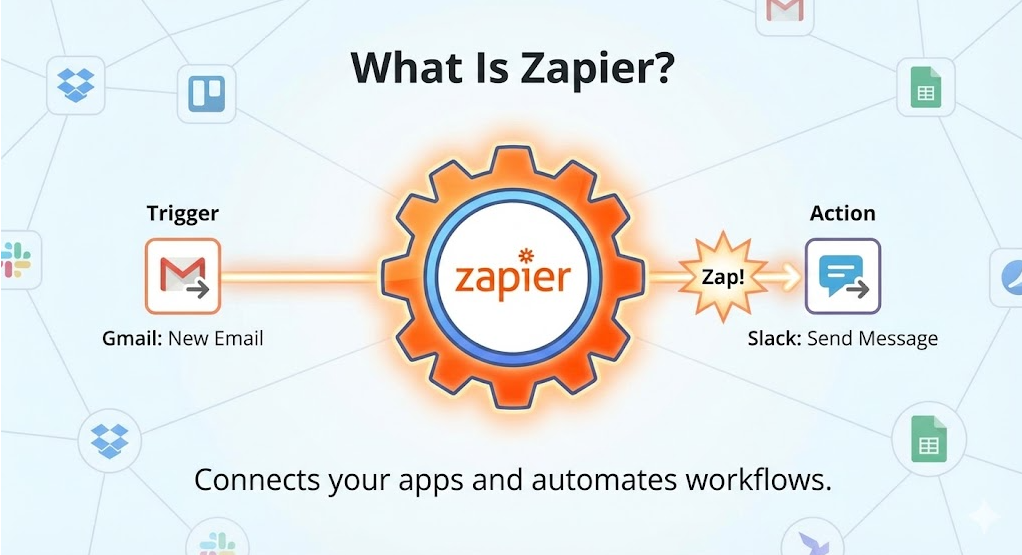
So how does Zapier actually perform this incredible magic? The secret lies in something called a “Zap.” A Zap is an automated workflow that you create to connect your apps. (source: https://www.musegravity.com/blogs/post/what-is-zapier-a-complete-guide, source: https://help.zapier.com/hc/en-us/articles/8496181725453-Learn-key-concepts-in-Zaps). Think of a Zap as a simple instruction or a recipe that you give to Zapier. Every Zap follows a very simple rule: When this happens, do that.
This simple principle is broken down into two key parts:
-
- The Trigger: This is the “when this happens” part. A trigger is a specific event that happens in one of your apps that kicks off the automated workflow. (source: https://zapier-82f0e938.mintlify.app/platform/quickstart/how-zapier-works, source: https://buffer.com/social-media-terms/zapier). It’s the starting pistol for the race.
- The Action: This is the “do that” part. An action is the event that Zapier automatically performs in another app after the trigger occurs. (source: https://zapier-82f0e938.mintlify.app/platform/quickstart/how-zapier-works). It’s the job that your robot helper does for you.
Let’s go back to our email example. You could create a Zap where:
-
- The Trigger is: “A new email with an attachment arrives in my Gmail inbox.”
- The Action is: “Save that attachment to my ‘Important Files’ folder in Dropbox.”
Once you set this Zap up, you never have to think about it again. Every single time an email with a file lands in your inbox, Zapier will instantly grab that file and put it safely in your Dropbox folder. You don’t have to lift a finger. Instead of you manually moving data and triggering events between your apps, Zapier handles it all for you based on the rules you set. (source: https://zapier-82f0e938.mintlify.app/platform/quickstart/how-zapier-works, source: https://buffer.com/social-media-terms/zapier).
To make all of this possible, Zapier relies on three fundamental concepts that work together behind the scenes:
-
- Authentication: Before Zapier can access your apps, you need to give it permission. Authentication is the secure process where you log in to your app accounts (like Google or Slack) through Zapier. Think of it like giving a trusted friend a specific key to your mailbox, but not your whole house. This allows Zapier to check for new information and perform actions on your behalf, using these secure credentials for every task it runs for you. (source: https://zapier-82f0e938.mintlify.app/platform/quickstart/how-zapier-works).
-
- Triggers: As we learned, these are the starting events. A trigger could be anything: receiving a new email, a customer filling out a form on your website, a new row being added to a Google Sheet, or a new contact being added to your address book. (source: https://zapier-82f0e938.mintlify.app/platform/quickstart/how-zapier-works).
- Actions: These are the resulting jobs that Zapier completes for you. An action could be creating a new task in your project management tool, sending a custom notification to a chat channel, updating a customer’s record in a database, or adding a new event to your calendar. (source: https://zapier-82f0e938.mintlify.app/platform/quickstart/how-zapier-works).
Unlocking Your Superpowers: A Deep Dive into Zapier’s Key Features
A Universe of Connections: Extensive App Integration
The true power of Zapier comes from the sheer number of apps it can connect to. We’re not talking about a handful of popular apps; Zapier connects to a mind-boggling 6,000 to 7,000 different applications! (source: https://www.musegravity.com/blogs/post/what-is-zapier-a-complete-guide, source: https://www.siit.io/tools/trending/zapier-review, source: https://www.lindy.ai/blog/zapier-review). This library of connections covers virtually every type of business software you can imagine.
This includes all the heavy hitters you use every day like Gmail, Slack, Salesforce, Dropbox, Notion, Trello, Google Calendar, and Microsoft Office 365. But it also includes thousands of other specialized tools for marketing, sales, accounting, project management, customer support, and so much more. This massive ecosystem means that no matter what combination of tools you or your company uses, there’s a very high chance that Zapier can connect them all, making it a nearly universal solution for any automation challenge you can dream up.
Creating Chain Reactions: Multi-Step Workflows
While a basic Zap has one trigger and one action, the real fun begins with multi-step Zaps. This is where you can create a powerful chain reaction of events, all started by a single trigger. A multi-step Zap can perform several actions across many different apps, all in a specific order. (source: https://www.musegravity.com/blogs/post/what-is-zapier-a-complete-guide, source: https://www.siit.io/tools/trending/zapier-review).
Imagine a new customer fills out a “Contact Us” form on your website. With a multi-step Zap, you can orchestrate a whole symphony of actions:
-
- (Trigger): A new form is submitted on your website.
- (Action 1): The customer’s information (name, email) is automatically added to your CRM, like Salesforce.
- (Action 2): Their email address is simultaneously added to your email marketing list in a tool like Mailchimp.
- (Action 3): A new task is automatically created in your project management tool (like Asana or Trello) and assigned to a salesperson, reminding them to follow up.
- (Action 4): A notification message is instantly sent to your team’s Slack channel, announcing the new lead with all their details.
All of that happens in seconds, without anyone needing to copy and paste a single piece of information. This isn’t just saving a few clicks; it’s ensuring that important tasks never fall through the cracks and that your team can respond instantly.
Getting Smarter: Advanced Logic and Filtering
What if you don’t want your Zaps to run every single time? What if you only want an action to happen under specific conditions? This is where Zapier’s advanced logic and filtering come into play. You can build conditional “if/then” rules into your Zaps, telling them to only proceed if certain criteria are met. (source: https://www.siit.io/tools/trending/zapier-review).
Think of it like giving your robot helper a more detailed set of instructions. Instead of just “save every email attachment,” you can say:
- IF a new email arrives from my boss, AND IF the subject line contains the word ‘Urgent,’ THEN save the attachment to the ‘Critical Files’ folder and send me a text message notification.
This level of control is incredibly powerful. You can also use Zapier to format data—for example, making sure all dates are in the same format or that names are properly capitalized—before sending it to another app. These features allow you to build sophisticated and intelligent automation paths that can adapt to different situations, just like a human would.
Lightning Fast: Real-Time Processing
In business, speed matters. When a customer needs help or a new sale comes in, you can’t afford to wait. Zapier is built for this, with Zaps executing almost instantly when their trigger event occurs. This real-time processing is crucial for supporting time-sensitive workflows and ensuring your business operations run smoothly without interruption. (source: https://www.siit.io/tools/trending/zapier-review). While there can sometimes be small delays depending on the apps involved, the platform is designed to be as close to instantaneous as possible.
Anyone Can Build: The Intuitive No-Code Interface
Perhaps the most amazing thing about Zapier is that you don’t need to be a programmer to use it. The platform features an incredibly user-friendly, visual interface. Building a Zap is like drawing a flowchart or connecting dots. You simply pick your trigger app, choose the event, and then pick your action app and what you want it to do. (source: https://www.musegravity.com/blogs/post/what-is-zapier-a-complete-guide, source: https://www.lindy.ai/blog/zapier-review). This “no-code” approach means that anyone in a company, from the marketing team to the HR department, can become an automation expert and build workflows to make their own jobs easier.
Better Together: Collaborative Team Features
Automation isn’t a solo sport. Zapier is built for teams. The platform allows you to create shared workspaces where multiple team members can build, manage, and view automations together. (source: https://www.siit.io/tools/trending/zapier-review). You can control who has permission to edit certain Zaps, ensuring that critical business processes are protected. This collaborative environment empowers entire departments to work together to streamline their processes and build a more efficient organization.
Zapier in the Wild: How Businesses are Using It Today
The possibilities with Zapier are nearly endless. To give you a better idea of its power, let’s look at how organizations are using it to solve real-world problems every single day. (source: https://www.siit.io/tools/trending/zapier-review).
-
- Lead Management Automation: Meet Sarah, a salesperson. She used to spend hours every week manually copying leads from Facebook Ads into her company’s CRM. Now, a Zap automatically captures every new lead from an ad, creates a new contact in the CRM, assigns it to her, and schedules a follow-up reminder in her calendar. She can spend her time talking to customers instead of doing data entry.
-
- IT Service Automation: Tom is the head of IT. When an employee had a computer problem, they would send an email, and Tom would have to manually create a ticket in their support system. Now, a Zap watches for emails sent to “support@company.com,” automatically creates a new support ticket, categorizes it based on keywords in the email, and notifies the right IT specialist in Slack.
-
- HR Operations Workflows: Maria in HR is responsible for onboarding new employees, which used to involve over a dozen manual steps. Today, when she adds a new employee to their HR system, a multi-step Zap takes over. It automatically creates a user account for them, adds them to the right email lists, enrolls them in training courses, and schedules their orientation meetings in their calendar.
-
- Document and File Management: A design agency uses Zapier to manage all their client files. When a designer uploads a new file to a specific Google Drive folder, a Zap automatically creates a backup copy in Dropbox, renames the file according to their company’s naming system, and sends a link to the client for their review via email.
- E-commerce and Customer Support: An online store has a Zap that triggers every time a new order is placed in Shopify. The Zap instantly adds the order details to a Google Sheet for their fulfillment team, generates an invoice in their accounting software, and sends a personalized “Thank You” email to the customer.
Who is Zapier For? Is It For You?
Because of its flexibility and ease of use, Zapier is for almost anyone who wants to be more productive. Its users come from all walks of life. (source: https://www.musegravity.com/blogs/post/what-is-zapier-a-complete-guide, source: https://www.siit.io/tools/trending/zapier-review).
-
- Individuals: People looking to optimize their personal lives, like automatically saving articles they like to a reading list or getting a text message when it’s about to rain.
-
- Small Business Owners: Entrepreneurs who wear many hats and need to automate their marketing, sales, and administrative tasks to save time and money.
-
- IT Managers: Professionals who use Zapier to connect complex systems across their entire company, ensuring that data flows smoothly and securely between different technology platforms.
-
- Operations Teams: The people responsible for making a business run smoothly. They use Zapier to streamline internal processes, from approvals to reporting.
- Support Professionals: Customer service teams who automate the process of routing customer questions, tracking issues, and following up to ensure every customer feels heard.
The Future is Now: Zapier and the Power of AI
Zapier started by automating simple tasks, but it’s now evolving into something even more powerful: an intelligent orchestration platform. The most exciting new frontier for the platform is its integration with Artificial Intelligence (AI). Recent developments have expanded Zapier’s capabilities to include incredible AI-powered features. (source: https://zapier.com).
This means you can now connect AI directly into your automated workflows. You can build Zaps that use AI to:
-
- Summarize long emails and send the summary to Slack.
-
- Analyze the tone of customer feedback and route urgent or unhappy messages to a manager.
- Draft a personalized reply to an inquiry and save it as a draft in your email.
Even more thrilling, Zapier now allows you to build your own custom AI agents and deliver on your company’s AI strategy. (source: https://zapier.com). Imagine creating a specialized robot assistant that understands your business and can perform complex, multi-step tasks that require decision-making. The platform is moving beyond just connecting apps; it’s providing the tools to build intelligent, automated systems that can think, create, and act.
Your Automation Journey Starts Today
In a world filled with endless notifications, tasks, and digital noise, Zapier stands out as a beacon of simplicity and power. It is the silent hero working behind the scenes, connecting your digital world and giving you back your most valuable resource: your time. By taking over the repetitive, manual tasks that drain your energy, it frees you up to think, create, and focus on what truly matters.
From simple two-step Zaps that save you a few minutes a day to complex, AI-powered workflows that can run entire business operations, Zapier is a tool that grows with you. It’s a testament to the idea that technology should work for us, not the other way around.
So, take a moment and think: what is that one boring, repetitive task you do every single day? Chances are, you can build a Zap for it. And once you do, you’ll be hooked, ready to embark on a thrilling journey of automation that will change the way you work forever.
Frequently Asked Questions
- What exactly is Zapier?
- Zapier is a cloud-based automation platform that connects your apps and services through automated workflows called Zaps, allowing you to automate repetitive tasks without coding.
- Do I need to know how to code to use Zapier?
- No, Zapier’s interface is designed to be user-friendly and no-code, making it accessible to anyone willing to build automated workflows by selecting triggers and actions visually.
- How many apps can Zapier connect to?
- Zapier supports integration with between 6,000 and 7,000 different applications, covering a comprehensive range of business and personal productivity tools.
- Can Zapier handle complex workflows?
- Yes, Zapier supports multi-step Zaps, conditional logic, and filters, enabling you to create sophisticated, multi-action automation tailored to your exact needs.
- How does Zapier integrate AI into its platform?
- Zapier has integrated AI capabilities that allow you to use AI-powered tools within your workflows such as summarizing emails, analyzing tone, drafting replies, and even building custom AI agents for your business.