


What is MATLAB? Your Ultimate Guide to the Powerhouse Behind Modern Science
What is MATLAB? Your Ultimate Guide to the Powerhouse Behind Modern Science
Estimated reading time: 12 minutes
Key Takeaways
- MATLAB is a powerful matrix-based programming language and platform widely used by engineers and scientists worldwide (source).
- Its unique ability to work with entire matrices simultaneously revolutionizes data and scientific computing (source).
- MATLAB offers an interactive environment with extensive libraries and graphic capabilities that accelerate algorithm development and visualization.
- The platform has broad applications in engineering, AI, robotics, embedded systems, and more (source).
- It integrates seamlessly with other languages like Python, Java, and C++, enabling deployment in enterprise and production systems.
Table of contents
- Introduction: What is MATLAB?
- The Core Idea: What Exactly is MATLAB?
- The Magic Behind the Matrix: How MATLAB Thinks
- Unpacking the Toolbox: Key Features and Capabilities of MATLAB
- MATLAB in the Real World: Where Is It Used?
- A Look Inside: The MATLAB Working Environment
- Playing Well with Others: Integration and Deployment
- Why Choose MATLAB? The Big Advantages
- The Final Word on a World-Changing Tool
- Frequently Asked Questions
Have you ever wondered what secret tool powers the minds behind self-driving cars, groundbreaking medical discoveries, and the wireless signals that connect our world? In the fast-paced universe of science and engineering, there are hidden engines driving innovation forward. One of the most important and powerful of these is a platform you might not have heard of, but which has shaped our modern world in countless ways. This incredible tool is called MATLAB.
So, what is MATLAB? Get ready to dive into the world of the “matrix laboratory,” a revolutionary computing environment that has become the go-to platform for millions of engineers and scientists across the globe. It's more than just a programming language; it's a complete workshop for solving the toughest problems in technology and research. From analyzing massive amounts of data to building the next generation of artificial intelligence, MATLAB is at the heart of the action.
In this ultimate guide, we will pull back the curtain on this incredible platform. We’ll explore what makes it so special, how it works its magic with numbers, and where you can see its impact in the real world. Prepare to be amazed by the power and simplicity of a tool designed to turn complex ideas into reality.
The Core Idea: What Exactly is MATLAB?
At its heart, MATLAB is a high-level programming language and a super-smart computing platform all rolled into one, created by a company called MathWorks. Think of it like a digital laboratory packed with every tool a scientist or engineer could ever need. Its very name, MATLAB, gives us a clue to its superpower: it stands for matrix laboratory (source).
But what’s a matrix? Imagine a big grid of numbers, like a spreadsheet. In the world of math and science, almost everything can be represented using these grids. From the pixels in a photo to the data from a weather satellite, matrices are everywhere. While most computer languages make you work with one number at a time, MATLAB lets you work with the entire grid—the whole matrix or array—at once (source). This single idea is what makes it so different and so powerful. It allows users to express complex mathematical ideas in a way that feels natural and simple (source).
This incredible tool has been helping brilliant minds since it became commercially available all the way back in 1984. Since then, it has become a standard piece of software in almost every university, research lab, and major technology company on the planet (source). It's the trusted companion for anyone involved in heavy-duty technical computing, deep data analysis, and developing brand-new algorithms that can change the world (source).
The Magic Behind the Matrix: How MATLAB Thinks
The real genius of MATLAB lies in its unique design. It was built from the ground up specifically for scientists and engineers, people who think in terms of equations, systems, and data sets (source). This focus makes solving technical problems incredibly fast and intuitive.
As we mentioned, its ability to handle whole matrices at once is a game-changer. Imagine you want to brighten every single pixel in a photograph. In a traditional programming language, you might have to write a complicated loop to go through each pixel, one by one, and change its value. In MATLAB, you can do it in a single, simple command that applies the change to the entire image matrix. This matrix-based approach makes your code cleaner, shorter, and much easier to understand.
But MATLAB is also incredibly flexible. It's what experts call an interpreted, multi-paradigm system (source). Let's break that down. “Interpreted” means you can type a command and get an answer right away, which is fantastic for experimenting and trying out new ideas. “Multi-paradigm” means you aren't locked into one way of writing code. You can program in different styles—whether it's a step-by-step procedural approach or a more complex object-oriented style—depending on what works best for your project. This flexibility makes it a powerful tool for both small-scale experiments and massive, complex software projects.
Unpacking the Toolbox: Key Features and Capabilities of MATLAB
Opening up MATLAB is like walking into the world's most advanced workshop. It’s filled with specialized tools designed to handle any challenge you can throw at it. Its power comes from a set of core features that work together seamlessly (source).
Here are the key components that make MATLAB a titan of technical computing:
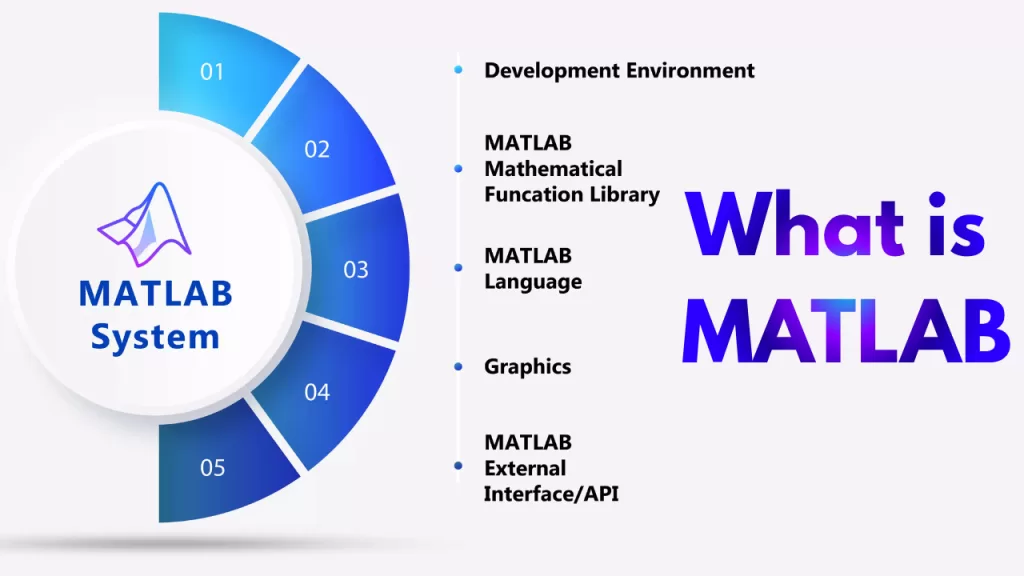
- A High-Level Programming Language: At its core, MATLAB is a language that is easy to read and write. It includes sophisticated data structures that allow you to organize your information in complex ways, far beyond simple numbers.
- A Stunning Graphics System: Data is useless if you can't see what it means. MATLAB comes with a built-in graphics system, known as Handle Graphics, that lets you create amazing, fully customizable two-dimensional and three-dimensional graphs and visualizations. You can turn rows of boring numbers into insightful charts that reveal hidden patterns.
- A Massive Computational Library: Why reinvent the wheel? MATLAB includes a huge library of pre-written, highly optimized mathematical functions. Need to solve a complex set of equations, find the statistical average of your data, or perform an advanced signal analysis? There's almost certainly a built-in function ready to go.
- An Application Programming Interface (API): MATLAB doesn't live in a bubble. It has a powerful API that allows it to talk to programs written in other languages. This means you can integrate MATLAB's incredible math power into almost any other software system you can imagine.
- An Interactive Work Environment: The platform provides a user-friendly environment where you can write, edit, test, and debug your code all in one place. This makes the whole process of developing new ideas much smoother and faster.
With this incredible toolbox, MATLAB excels in a breathtaking number of areas. It’s a master of linear algebra, differential equations, Fourier transforms (a way of analyzing waves and signals), matrix manipulations, statistics, data analysis, numerical integration, curve fitting, and signal processing (source). If it involves numbers, chances are MATLAB can conquer it.
MATLAB in the Real World: Where Is It Used?
The most exciting part about MATLAB is seeing where it’s making a real difference. This isn't just a tool for academics in a lab; it's actively building the future all around us. The applications are practically limitless and span across nearly every field of science and technology (source).
Let’s take a thrilling tour of some of the places MATLAB is at work:
- Engineering and Scientific Marvels: From designing the aerodynamics of a Formula 1 car to modeling the complex forces on a suspension bridge, engineers use MATLAB to simulate and test their creations before they are ever built. Scientists use it to analyze climate data, model the spread of diseases, and unlock the secrets of the universe.
- Data Analysis and Visualization: In the age of big data, MATLAB is a data scientist's best friend. It can sift through mountains of information, find meaningful trends, and create stunning visualizations that make complex data easy for anyone to understand.
- Signal and Image Processing: Have you ever wondered how your phone’s camera can automatically detect faces or how a doctor can get a crystal-clear MRI scan? That's the magic of signal and image processing, and MATLAB is a leading tool for developing the algorithms that make it possible.
- Control Systems Engineering: The “brain” inside many modern machines is a control system. Think about the cruise control in your car, the autopilot in an airplane, or the system that keeps a power grid stable. Engineers use MATLAB to design, test, and perfect these complex control systems.
- Wireless Communications: The 5G network that brings lightning-fast internet to your phone didn't just appear out of thin air. It was designed and tested by engineers using tools like MATLAB to simulate how radio waves travel and to create technologies that send more data, faster and more reliably than ever before.
- Robotics: Programming a robot to perform a delicate task, like assembling a smartphone or assisting in surgery, requires incredible precision. MATLAB is used to model the robot's movements and develop the control algorithms that guide its every action.
- Embedded Systems: The tiny computers inside your smartwatch, your digital camera, or your washing machine are called embedded systems. Developers use MATLAB to write and test the code that runs on these tiny but powerful chips.
- Internet of Things (IoT): MATLAB helps connect our world by developing the systems that allow smart devices—from your thermostat to factory sensors—to communicate with each other and the cloud.
- Deep Learning and Artificial Intelligence: This is one of the most exciting frontiers. MATLAB provides powerful tools for creating and training deep learning models, the foundation of modern AI. Scientists use it to build neural networks that can learn to recognize images, understand human speech, and even drive cars.
Furthermore, MATLAB is the engine behind Simulink, a sister product that provides a block diagram environment. With Simulink, engineers can draw out complex systems—like an entire car's electrical system or a wind turbine—and simulate how all the parts will work together in the real world (source).
A Look Inside: The MATLAB Working Environment
When you launch MATLAB, you are greeted by an interactive desktop that is designed to be your command center for discovery. It’s a clean, organized space that puts all the most important tools right at your fingertips. The environment is cleverly designed to make your workflow smooth and efficient (source).
Here are the main parts of the MATLAB workspace:
- The Command Window: This is the heart of the interactive experience. You can type single commands here and see the results immediately. It's the perfect place for quick calculations, testing a piece of code, or exploring your data.
- The Script Editor: For longer, more complex programs, you’ll use the editor. This is where you can write, save, and manage your MATLAB files (called scripts or functions). The editor is packed with helpful features like color-coding and automatic error-checking to help you write better code.
- The Workspace Window: This window is your data dashboard. It shows you a list of all the variables you have created, their values, and their size. It’s an incredibly useful tool for keeping track of your work and understanding what’s happening inside your program.
- The Current Folder Tree: This is like a file explorer built right into MATLAB. It shows you all the files and folders in your current directory, making it easy to navigate your projects and access the files you need.
- Built-in Tools: On top of these windows, the environment is filled with tools for plotting your data, analyzing statistics, and debugging your code to find and fix mistakes.
This all-in-one environment encourages a cycle of experimentation and discovery. You can quickly write a piece of code, run it, see the results visually, and then easily make changes to try something new.
Playing Well with Others: Integration and Deployment
One of MATLAB's greatest strengths in the modern tech world is its ability to be a team player. A brilliant algorithm is only useful if it can be put to work in a real-world application. That's why MATLAB is designed to integrate seamlessly with a huge variety of other programming languages and platforms.
It can connect and share data with popular languages including Python, Java, C, C++, .NET, FORTRAN, and Perl (source, source, source). This amazing capability means that a data science team can develop a powerful machine learning model in MATLAB and then hand it off to a web development team to be included in a website or a mobile app.
This allows developers to deploy their MATLAB algorithms and applications directly into web, enterprise, and production systems (source). Even more impressively, MATLAB is built to scale. When you need to analyze truly massive datasets that won't fit on a single computer, you can scale your MATLAB analyses to run across powerful computer clusters and clouds (source). This makes it a serious tool for enterprise-level big data and artificial intelligence projects.
Why Choose MATLAB? The Big Advantages
With so many programming languages out there, what makes millions of people choose MATLAB? The answer lies in a unique combination of power and simplicity that is hard to find anywhere else. It offers several distinct advantages that make it the perfect tool for students, researchers, and professional developers alike (source, source).
- Surprisingly Beginner-Friendly: Despite its incredible power, MATLAB is known for being accessible and relatively easy to learn, even for people who have never programmed before. Its straightforward syntax and interactive environment make it an excellent choice for teaching and learning.
- Lightning-Fast Algorithm Development: Compared to traditional languages like C or FORTRAN, developing and testing new ideas in MATLAB is incredibly fast. The matrix-based language and vast library of built-in functions mean you can write code in a fraction of the time, allowing you to focus on the problem, not the programming.
- Specialized Libraries and Toolboxes: MathWorks offers a huge collection of “toolboxes,” which are specialized libraries of functions for specific tasks like image processing, financial modeling, or deep learning. These toolboxes provide expert-level tools right out of the box.
- Amazing Built-in Graphics: The ability to instantly visualize your data is one of MATLAB’s most beloved features. Creating plots and graphs is simple, allowing you to gain insights and check your results visually as you work.
- Powerful Debugging and Testing Tools: Writing code is one thing, but making sure it's correct and reliable is another. MATLAB includes professional-grade tools for testing your code, finding bugs, and improving its quality and performance.
Ultimately, MATLAB creates an environment that invites curiosity, experimentation, and discovery (source). It perfectly combines raw computational power with a user-friendly interface, making it the ideal platform for both learning the fundamentals and pushing the boundaries of what’s possible.
The Final Word on a World-Changing Tool
From its simple beginnings as a “matrix laboratory,” MATLAB has grown into a global standard for technical computing. It is far more than just a piece of software; it is a comprehensive ecosystem for innovation. Its unique ability to think in terms of matrices and arrays allows it to speak the native language of science and mathematics, simplifying complexity and accelerating discovery.
We see its influence everywhere—in the smartphones we use, the cars we drive, the medical care we receive, and the AI that is reshaping our future. For anyone who dreams of solving big problems, uncovering new knowledge, or building the technologies of tomorrow, MATLAB remains an essential, powerful, and inspiring tool. It continues to be the silent partner for the brilliant minds who are busy engineering a better world.
Frequently Asked Questions
- What is MATLAB?
- What can I do with MATLAB?
- How difficult is it to learn MATLAB?
- Is MATLAB used in industry?
- Can MATLAB integrate with other programming languages?
What is MATLAB?
MATLAB is a high-level programming language and interactive environment that specializes in matrix and numerical computing. It provides tools for algorithm development, data visualization, and mathematical modeling (source).
What can I do with MATLAB?
You can use MATLAB to analyze data, develop algorithms, create models and simulations, visualize data graphs, and deploy code for applications in industries like engineering, AI, signal processing, and robotics (source).
How difficult is it to learn MATLAB?
MATLAB is considered beginner-friendly and easy to learn due to its simple syntax and interactive command interface, making it accessible even for users without prior programming experience (https://www.coursera.org/articles/what-is-matlab).
Is MATLAB used in industry?
Yes, MATLAB is widely used in industries including automotive, aerospace, telecommunications, finance, and healthcare for simulation, data analysis, control systems, and algorithm development (source).
Can MATLAB integrate with other programming languages?
Absolutely. MATLAB integrates and exchanges data with languages such as Python, Java, C, C++, and more, enabling deployment of MATLAB algorithms within various software environments (source).