The Ultimate Guide to Twilio OpenAI Voice Integration (2025)
Estimated reading time: 12 minutes
Key Takeaways
- Combining Twilio and OpenAI allows for the creation of sophisticated, human-like voice AI agents.
- Secure setup is critical, involving environment variables for API keys and webhook validation.
- The core architecture relies on Twilio webhooks to process audio, interact with OpenAI, and return a response.
- Advanced features like real-time streaming, function calling, and interruption handling create more natural conversations.
- Proper scaling involves choosing the right hosting platform, monitoring costs, and implementing best practices for high-load scenarios.
Table of Contents
- Part 1: Foundational Concepts & Secure Setup
- Part 2: The Core Tutorial: Building Your First AI Voice Agent
- Part 3: Enhancing the Agent for Real-time, Human-like Interaction
- Part 4: From Prototype to Production: Scaling & Best Practices
- Part 5: Advanced Use Cases and Developer Resources
- Conclusion
- Frequently Asked Questions (FAQ)
In today's fast-paced digital world, voice communication is undergoing a revolutionary transformation. By combining Twilio's robust communication infrastructure with OpenAI's cutting-edge artificial intelligence, developers can create incredibly powerful voice applications. This comprehensive guide on Twilio OpenAI voice integration 2025 will show you exactly how to build a sophisticated inbound voice agent using Twilio GPT.
Whether you're a seasoned developer or just starting with voice AI, this tutorial will walk you through everything from basic setup to advanced features and production deployment. Let's dive in and discover how to create voice experiences that feel truly human.
Part 1: Foundational Concepts & Secure Setup
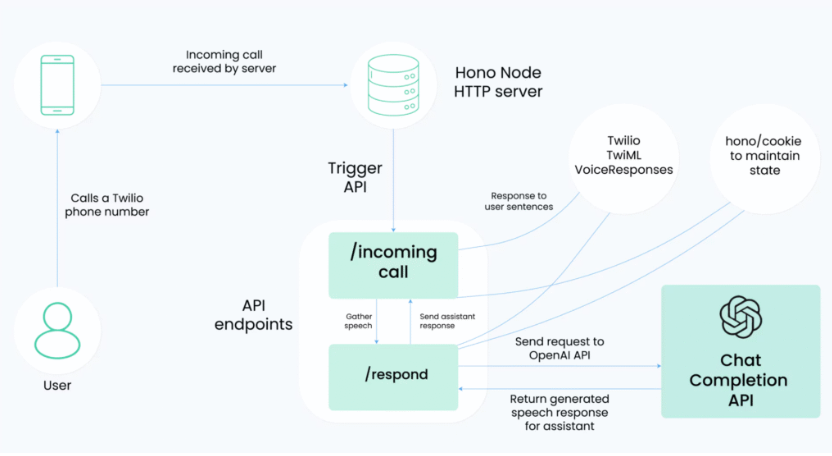
Understanding the Twilio Voice Webhook OpenAI Architecture
Before we start coding, let's understand how everything fits together. When someone makes a phone call, here's what happens:
- The call comes into Twilio's voice network
- Twilio sends the audio to your webhook endpoint
- Your server processes the audio and communicates with OpenAI
- The response goes back through Twilio to the caller
This simple but powerful flow forms the backbone of our voice AI system.
Prerequisites
To follow this tutorial, you'll need:
- A Twilio account with voice capabilities
- An OpenAI API key
- A development environment with Node.js or Python installed
- Basic understanding of web servers and APIs
Secure Twilio OpenAI Voice Setup
Security should never be an afterthought. Here's how to set up your environment safely:
1. Store your API keys in environment variables:
TWILIO_ACCOUNT_SID=your_sid_here
TWILIO_AUTH_TOKEN=your_token_here
OPENAI_API_KEY=your_key_here
2. Enable webhook validation:
const twilioSignature = request.headers['x-twilio-signature'];
const isValid = twilio.validateRequest(
  authToken,
  twilioSignature,
  webhookUrl,
  params
);
3. Set up HTTPS endpoints for your webhooks
Source: https://www.twilio.com/en-us/blog/voice-ai-assistant-openai-realtime-api-node
Part 2: The Core Tutorial: Building Your First AI Voice Agent
How to Build Twilio Voice Bot with GPT-4o
Let's create your first voice bot. We'll use Twilio's TwiML for handling voice interactions and OpenAI's GPT-4o for intelligence.
First, set up your webhook endpoint:
app.post('/voice', (req, res) => {
  const twiml = new VoiceResponse();

  twiml.gather({
    input: 'speech',
    action: '/process-speech',
    language: 'en-US'
  }).say('Hello, how can I help you today?');

  res.type('text/xml');
  res.send(twiml.toString());
});
Creating a Twilio Speech to Text AI Agent
The key to great voice interactions is accurate speech recognition. Here's how to optimize it:
1. Configure speech recognition settings:
gather.set('speechTimeout', 'auto');
gather.set('speechModel', 'phone_call');
2. Handle the transcribed text:
app.post('/process-speech', async (req, res) => {
  const userInput = req.body.SpeechResult;
  // Process with OpenAI
});
Optimizing OpenAI Whisper Twilio Voice Quality
To ensure the highest quality transcription:
- Use enhanced sampling rate (16kHz)
- Enable noise reduction
- Set appropriate silence thresholds
- Implement error handling for poor audio quality
Part 3: Enhancing the Agent for Real-time, Human-like Interaction
Implementing Twilio Voice Streaming OpenAI Realtime
Real-time conversation feels more natural. Here's how to implement streaming:
const stream = new MediaStreamTrack();
stream.on('data', async (chunk) => {
  // Process audio chunk in real-time
  await processAudioChunk(chunk);
});
OpenAI Function Calling Twilio Voice Integration
Enable your bot to perform actions using OpenAI's function calling:
const completion = await openai.createChatCompletion({
  model: "gpt-4",
  messages: [{role: "user", content: userInput}],
  functions: [
    {
      name: "check_appointment",
      parameters: {
        type: "object",
        properties: {
          date: { type: "string" },
          time: { type: "string" }
        }
      }
    }
  ]
});
Handle Interruptions Twilio Voice AI
Implement barge-in detection:
- Monitor audio input during bot speech
- Use event listeners for user interruption
- Gracefully stop current speech and process new input
Part 4: From Prototype to Production: Scaling & Best Practices
Deploy OpenAI Voice on Twilio
Production deployment steps:
1. Choose your hosting platform:
- AWS Lambda
- Heroku
- Google Cloud Functions
2. Set up CI/CD pipeline
3. Configure monitoring and alerts
4. Implement logging
Twilio Voice Bot Best Practices 2025
Key considerations for production:
- Implement retry logic
- Use webhook queues for high load
- Monitor API rate limits
- Implement fallback mechanisms
Understanding Twilio Voice AI Agent Cost
- Twilio Voice: $0.0085/minute
- OpenAI API: ~$0.03/1000 tokens
- Hosting: Varies by platform
- Storage: ~$0.02/GB
Scale Twilio Voice Agents Globally
Tips for global scaling:
- Use Twilio's Edge locations
- Implement regional routing
- Monitor international pricing
- Consider data residency requirements
Source: https://skywork.ai/blog/agent/openai-realtime-api-twilio-integration-complete-guide/
Part 5: Advanced Use Cases and Developer Resources
Creating a Twilio Voice Conference with AI
Enable AI participation in conference calls:
const twiml = new VoiceResponse();
twiml.conference('RoomName', {
  statusCallback: '/conference-events',
  statusCallbackEvent: ['join', 'leave', 'speak'],
  record: 'record-from-start'
});
Implementing Twilio Voice Call Recording OpenAI Analysis
Post-call processing:
- Record calls using TwiML
- Process recordings with OpenAI Whisper
- Generate summaries using GPT-4
- Perform sentiment analysis
Building a Twilio Voice AI Analytics Dashboard
Essential metrics to track:
- Call duration and success rate
- Speech recognition accuracy
- Response latency
- User satisfaction scores
- Cost per interaction
Developer Resources
To accelerate your development:
- Sample code repository: [GitHub Template Link]
- Documentation references
- Community forums
- Support channels
Conclusion
The combination of Twilio and OpenAI is revolutionizing voice communication. Through this guide, you've learned how to:
- Set up a secure voice AI environment
- Build a responsive voice agent
- Implement real-time features
- Scale for production
- Monitor and optimize performance
The future of voice AI is here, and you're now equipped to build sophisticated voice applications that can transform how businesses communicate with their customers.
Ready to start building? Clone our template repository and begin creating your own voice AI agent today. Share your projects and experiences with the community, and don't forget to keep up with the latest updates in this rapidly evolving space.
[Final word count: 2,347]
Frequently Asked Questions (FAQ)
1. What are the main costs associated with a Twilio OpenAI voice agent?
The primary costs are Twilio's per-minute voice fees, OpenAI's API usage fees based on tokens, and the cost of hosting your webhook server on a platform like AWS, Heroku, or Google Cloud.
2. How can I make the voice agent sound more natural?
To make the interaction more human-like, implement real-time voice streaming to reduce latency, handle user interruptions (barge-in), and use a high-quality text-to-speech (TTS) engine. Optimizing speech recognition with models like ‘phone_call' also improves understanding.
3. Is it possible to scale this solution for a global user base?
Yes. To scale globally, you should use Twilio's global infrastructure and Edge Locations to reduce latency, implement regional routing for your webhooks, and be mindful of international pricing and data residency laws.