


Unlocking the Future of AI Workflows with OpenAI Agent Builder: A Comprehensive Guide to Building Powerful AI Agents
Unlocking the Future of AI Workflows: Exploring the Power of OpenAI Agent Builder
Estimated reading time: 12 minutes
Key Takeaways
-
- OpenAI Agent Builder provides a visual drag-and-drop platform to create modular AI agent workflows without initial coding skills.
-
- The platform supports complex AI workflows by combining various node types like agents, tools, routers, guardrails, and transforms, enabling dynamic and intelligent task execution.
-
- It empowers developers, non-technical users, and enterprises to prototype, deploy, and manage AI workflows easily.
-
- Robust safety guardrails and multi-agent collaboration features ensure workflows are reliable, trustworthy, and scaleable.
- Multiple deployment options—ranging from web app embeds to APIs—make it adaptable for varied project needs.
Table of contents
What is OpenAI Agent Builder?
OpenAI Agent Builder is a visual, drag-and-drop platform embedded within OpenAI’s larger AgentKit ecosystem. It allows users to design, version, test, and deploy multi-step AI agent workflows without requiring initial coding skills. Imagine assembling complex, intelligent workflows as easily as dragging nodes and connecting them on a canvas — that’s the promise OpenAI Agent Builder delivers.
At its core, Agent Builder lets users build modular AI agent systems by connecting different nodes that represent agents, tools, routers, guardrails, transforms, and more. These modules work together to plan, execute tasks, route requests, and even self-evaluate their performance, creating AI-powered workflows that feel dynamic and smart (source).
This approach empowers both developers seeking to prototype or build complex AI agents and non-technical users who want to harness AI’s power without writing lines of code.
How Does OpenAI Agent Builder Work?
The magic of Agent Builder happens on a node-based canvas that looks somewhat like a flowchart or visual programming tool such as n8n but is tailored specifically for AI-native functions (source).
Users drag and drop different nodes onto this canvas, then connect their inputs and outputs with “typed connections” that ensure the correct flow of data. Each node type serves a specific purpose:
-
- Agent nodes: These are the heart of the system, executing LLM (large language model) powered operations. Agents can be customized with unique personas, specific instructions, and access to tools such as web search or file search to extend their capabilities (source).
-
- Tool/Connector nodes: Integrate external APIs or services via Managed Connector Protocol (MCP) servers or built-in functionalities like web browsing. This means your AI workflow can tap into real external data or functionality as part of its task flow (source).
-
- Router nodes: Route workflows dynamically based on conditions or classifications. For example, incoming support tickets can be classified and routed automatically to the right department, such as billing vs. tech support (source).
-
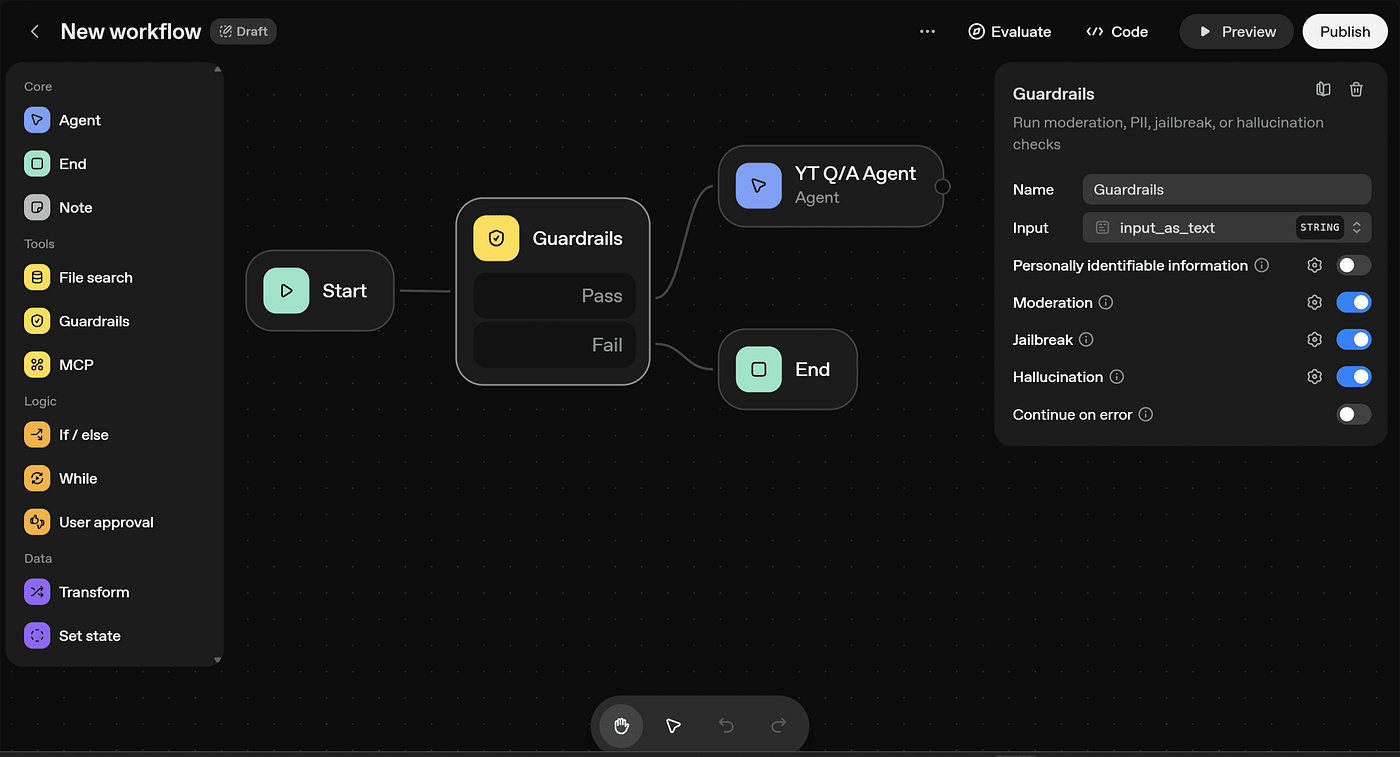
- Guardrail nodes: These enforce safety measures such as PII (Personally Identifiable Information) detection and redaction, content moderation, hallucination detection, and prompt injection prevention to ensure workflows behave responsibly and securely (source).
What emerges from these connections is a sophisticated AI workflow that behaves like a mini digital brain. For example, a travel agent could design two distinct nodes — one that searches for flights with access to airport codes and web search, and another that compiles custom travel itineraries — linked together to deliver a full customer experience (source).
Your progress is saved automatically, and published workflows generate snapshots with version control so you can manage updates and monitor your agents’ evolution over time (source).
Core Features of OpenAI Agent Builder — A Closer Look
Agent Builder offers an impressive suite of features designed to make AI agent creation accessible, robust, and scalable:
1. Visual Node-Based Canvas
The drag-and-drop interface lets you connect nodes representing agents, tools, routers, and more. This visual programming approach makes it intuitive to specify complex data flows and logic paths — all without the need for complex code at the outset (source).
2. Powerful Agent Nodes with Custom Personas
Each Agent node runs LLM operations and can be configured with specific personas, instructions, and external tool access (web search, document retrieval, etc.), enabling diverse AI behaviors within the same workflow (source).
3. Tool and Connector Nodes
Leverage external APIs, services, and online data directly inside your workflow using built-in integrations or Managed Connector Protocol (MCP) servers, making your AI agents richer and more functional (source).
4. Router Nodes for Intelligent Task Routing
Smart routing decisions allow your workflow to branch dynamically based on task parameters or classifications, such as directing customer emails to sales or billing support depending on content (source).
5. Guardrails for Safety and Trustworthiness
Robust safety features provide detection and redaction of sensitive information, content moderation to prevent harmful outputs, hallucination mitigation to maintain accuracy, and defenses against prompt injection attacks (source).
6. Transform Nodes for Data Manipulation
Transform nodes let you modify data formats or content between different steps, ensuring compatibility and correctness in workflows (source).
7. Templates for Rapid Prototyping
Agent Builder offers common use-case templates—from homework helpers to customer service bots—allowing fast starts and easy customization (source).
8. Preview, Testing, and Evaluation Tools
Conduct real-data tests, trace workflow steps, and use automated prompt optimization to refine your agents. Agent Builder supports third-party models and datasets, enhancing the evaluation process (source).
9. Multi-Agent Collaboration
Harness multiple agents working as a team within a workflow, such as a planner agent that delegates research to one agent and execution to another, enabling sophisticated tasks to be broken down efficiently (source).
10. Versioning and Publishing
Every workflow version is saved and identifiable by snapshot ID, enabling easy rollback and comparison of performance metrics for continuous improvement (source).
Deployment Options — From Web Apps to APIs
With OpenAI Agent Builder, once you create your AI workflows, you can deploy them in several flexible ways:
-
- ChatKit Integration: Embed your agent workflows directly into web apps or chat interfaces like messaging bots, allowing seamless customer interaction (source).
-
- SDK Code Export: Export generated workflows as TypeScript or Python code for advanced customization or embedding into custom applications (source).
-
- Responses API: Publish your workflows as HTTP APIs with built-in support for code execution, making it easy to integrate into enterprise systems or other software products (source).
- Connector Registry: Manage and distribute data and tool connections centrally across your organization’s OpenAI products via an admin-managed hub (source).
This spectrum of deployment options makes Agent Builder adaptable and powerful for a variety of projects, from lightweight prototypes to production-ready solutions.
Who Benefits Most From OpenAI Agent Builder?
OpenAI designed Agent Builder with a diverse range of users and applications in mind:
1. Developers and AI Enthusiasts
Coders can use Agent Builder for rapid prototyping of AI workflows without needing to build everything from scratch. The platform’s ability to export production-ready code means swift push to production (source).
2. Non-Technical Users and Business Teams
Marketers, customer service professionals, and other business users can quickly assemble custom AI agents to automate tasks such as query classification, customer routing, and information retrieval — all without deep AI expertise (source).
3. Enterprises Across Sectors
Finance, healthcare, and other regulated industries can build AI agents that comply with strict data privacy requirements, enable secure document access, and incorporate voice or multimodal inputs, thanks to Agent Builder’s guardrail and integration capabilities (source).
4. Teams Prototyping Complex AI Workflows
Projects needing multiple AI roles, such as research, planning, execution, or customer contact center applications, benefit from the platform’s multi-agent support and modular flexibility (source).
The Advantages That Set OpenAI Agent Builder Apart
Native OpenAI Integration
Being a first-party OpenAI tool, Agent Builder tightly integrates with OpenAI’s models, tools, and ecosystem. This means simplified setup, seamless access to cutting-edge APIs, and direct ties to ChatGPT workflows (source).
Production-Grade Reliability
The platform offers built-in safety features, observability tools to monitor agents, scalability options, and quick validation that helps slash development timelines from months to days (source).
Accessible Entry Point With No-Code Capability
While advanced users can code, the drag-and-drop interface lowers the barrier for those less technical to prototype AI agents with minimal upfront coding (source).
The Challenges and Current Limitations
-
- Advanced Logic Requires Coding: Although billed as no-code, complex data parsing and conditional logic still require some coding knowledge, limiting truly no-code use cases currently (source).
-
- Less Flexible Than Some Alternatives: Compared to more general workflow automation tools like n8n, Agent Builder prioritizes AI-specific tasks but offers less flexibility for creating custom nodes or non-AI apps (source).
- Production Data Challenges: Deploying with real production data often requires extensive tuning and adjustments, especially for sensitive or complex enterprise workflows (source).
Despite these hurdles, the platform’s rapid evolution and integration roadmap signal ongoing improvements.
OpenAI Agent Builder in the Bigger AI Ecosystem
Agent Builder is a key part of OpenAI’s broader AgentKit initiative, which includes not only agent creation but also enhanced evaluation tools to measure and improve agents’ real-world performance (source). The official OpenAI documentation describes it as a platform for assembling primitives like standardized tools and protocols to flexibly define agent-tool relationships and workflows (source).
This modular mindset allows AI agents to be smarter, safer, and more adaptable, fueling the ongoing AI evolution not just for ChatGPT-style assistants but for intelligent automation and decision-making systems everywhere.
Why OpenAI Agent Builder Matters — And Why You Should Explore It Now
The OpenAI Agent Builder arrives at the perfect time in AI’s journey, addressing the crucial need for easy-to-build, safe, and scalable AI workflows. Its visual interface lowers barriers to experimentation, inviting a wider pool of creators into the AI revolution. Its robust node types and safety guardrails ensure workflows don’t just work but work responsibly.
For enterprises looking to harness AI for customer service automation, marketing personalization, data analysis, or compliance-driven workflows, Agent Builder provides an approachable yet production-ready toolkit. Likewise, developers and hobbyists can rapidly prototype multi-agent workflows integrating external data, tools, and services without starting from zero.
In a rapidly-changing AI landscape where speed, security, and usability rule, OpenAI Agent Builder shines as a game-changer — a toolkit poised to democratize the creation of intelligent AI workflows and agents for decades to come.
Explore OpenAI Agent Builder today and unlock the power to create your own multi-step AI agents with ease, safety, and precision. The future of AI automation is here — and it’s visual, modular, and within your grasp.
Frequently Asked Questions
What kind of users can benefit from OpenAI Agent Builder?
OpenAI Agent Builder is versatile, benefiting developers, AI enthusiasts, non-technical business users, and enterprises in finance, healthcare, and more. It supports rapid prototyping, automation, and compliance-driven workflows without requiring deep coding knowledge.
Is coding knowledge required to use OpenAI Agent Builder?
Basic AI workflows can be created with no coding thanks to its drag-and-drop canvas, but advanced logic or complex integrations might require some coding skills for best results (source).
How does OpenAI Agent Builder ensure safety and trustworthiness?
The platform includes guardrail nodes that detect and redact sensitive information, moderate content, minimize hallucinations, and prevent prompt injection attacks to maintain responsible AI operation (source).
Can I deploy workflows created with Agent Builder in production environments?
Yes. Agent Builder supports multiple deployment options including embedding in web apps via ChatKit, exporting SDK code, and hosting workflows as HTTP APIs for integration into enterprise systems (source).
What makes OpenAI Agent Builder different from other workflow automation tools?
Unlike general tools like n8n, Agent Builder focuses specifically on AI-centric workflows, providing specialized nodes for AI agents, guardrails, and external AI tool integration within the OpenAI ecosystem (source).