


Unleashed! Discover How ChatGPT Atlas is Revolutionizing Your Internet Journey
Estimated reading time: 13 minutes
Key Takeaways
-
- ChatGPT Atlas is OpenAI's new AI-powered web browser, launched in October 2025.
-
- It integrates ChatGPT directly into the browsing experience, acting as a persistent digital co-pilot.
-
- Key features include the *“Ask ChatGPT” sidebar*, context-aware AI assistance, and an innovative *Agent Mode*.
-
- Agent Mode (currently in preview) enables autonomous research, planning, and booking under user supervision, with robust privacy safeguards.
-
- Privacy is a core commitment: browsing content is *not* used for training AI models, and users have full control over data retention.
-
- Currently available for macOS ChatGPT Plus, Pro, and Business subscribers; Windows, iOS, and Android support are confirmed as coming soon.
- Atlas offers practical benefits across research, job hunts, shopping, studying, and general content consumption, enhancing productivity.
Table of contents
Prepare for a journey into the future of the internet, where browsing is no longer just about clicking links, but about having a brilliant AI assistant right by your side, always ready to help! This week, the most thrilling news in the world of artificial intelligence comes from OpenAI, who have just pulled back the curtain on something truly extraordinary: ChatGPT Atlas. This isn't just another update; it's a brand-new way to experience the web, and it's set to change everything you thought you knew about online exploration.
Imagine a world where your web browser isn't just a window to the internet, but a smart companion that understands what you're doing, remembers what you care about, and helps you get things done faster and smarter than ever before. That's the promise of ChatGPT Atlas. It's OpenAI's newly launched AI-powered web browser that fundamentally reimagines how users interact with the internet by integrating ChatGPT directly into the browsing experience.
Launched in October 2025, Atlas transforms traditional web navigation by embedding an AI assistant into every webpage, eliminating the need to juggle multiple tabs or constantly switch between applications.
It’s like giving your browser a super-brain, allowing you to ask questions, understand complex information, and even perform tasks without ever leaving the page you’re on. Get ready, because the way we explore, learn, and work online is about to be wonderfully transformed!
The Brain Behind the Browser: What is ChatGPT Atlas?
At its heart, ChatGPT Atlas is designed to be your ultimate digital co-pilot. Think of your regular web browser, but now imagine it infused with the incredible power of OpenAI's most advanced artificial intelligence. ChatGPT Atlas operates as a standard web browser with integrated ChatGPT capabilities built into the interface.
This means that the cutting-edge intelligence of ChatGPT isn't just a separate tool you open in another tab; it's woven into the very fabric of your browsing experience, always accessible, always relevant.
The browser's primary strength lies in its assistant-first workflow, a truly innovative approach where you can keep a persistent ChatGPT panel right beside any webpage you're viewing.
This isn't just a small pop-up; it's a full-fledged AI companion that stays with you, observing and understanding the content you're engaging with. This revolutionary design allows you to ask questions, analyze content, and take action without interrupting your browsing or switching contexts.
No more opening new tabs for quick searches, no more copying and pasting text into a separate AI tool, no more losing your train of thought as you navigate between different applications. Atlas keeps you in the flow, making your online activities smoother and far more efficient.
The fundamental workflow is beautifully simple and incredibly powerful. It involves opening a page, then asking ChatGPT a task related to what's on screen, and receiving an answer with citations or structured output.
Imagine reading a complicated science article; you can simply type a question to your Atlas assistant, asking it to explain a tough concept. Atlas will read the article, understand your question, and give you a clear, easy-to-understand answer, often pointing you to exactly where that information came from on the page. But it doesn't stop there! You can then ask follow-up questions, export summaries, or continue working in the same window without losing context.
This ability to maintain context and continue a conversation with the AI, all while interacting with the webpage, is what makes ChatGPT Atlas a true game-changer in the world of web browsing and artificial intelligence. It's like having a brilliant research assistant, a personal tutor, and a super-smart concierge, all rolled into one, right there in your browser!
Unveiling the Power: Key Features of ChatGPT Atlas
The magic of ChatGPT Atlas truly shines through its innovative features, each designed to make your online life easier, faster, and more productive. Let's dive into some of the incredible capabilities that make this new browser a must-have for anyone looking to supercharge their digital experience.
The “Ask ChatGPT” Sidebar: Your Permanent Co-Pilot
This is where the real-time interaction happens! The interactive sidebar serves as your permanent co-pilot, analyzing the content of any webpage you're viewing and responding instantly to your questions.
No matter what site you visit, whether it's a news article, an online store, or a dense academic paper, the Atlas sidebar is there, silently reading alongside you, ready to spring into action.
For example, if you're engrossed in reading a complex financial report filled with intimidating jargon and numbers, you no longer need to feel overwhelmed. You can simply ask Atlas to summarize key points, compare figures, or explain technical concepts without leaving the page.
Imagine the time saved, the frustration avoided! This amazing feature eliminates constant back-and-forth navigation, freeing you from the endless cycle of opening new tabs for quick facts or definitions. This continuous, intelligent assistance is estimated to save intensive users approximately 45 minutes per day.
Think about what you could do with an extra 45 minutes every day – learn a new skill, spend time with loved ones, or simply relax! Atlas makes that extra time a reality by streamlining your information gathering and understanding. It transforms passive reading into an active, engaging, and highly efficient learning process.
Context-Aware AI Assistance: Your Smartest Guide
One of the most impressive aspects of Atlas is its ability to understand not just your words, but also the situation you're in. Atlas leverages contextual understanding of what you're viewing to generate relevant responses.
This means it doesn't just give you generic answers; it gives you answers that truly matter *right now*, based on the specific page you're looking at.
Let's imagine you're planning an exciting outdoor adventure. In practical terms, if you're browsing an Airbnb listing for a camping trip in a beautiful national park, you can ask ChatGPT about nearby hiking trails or outdoor activities without opening a new search tab. The AI assistant uses the context from your current page, like the location of the Airbnb, to provide localized recommendations.
It's like having a local expert instantly available, ready to share the best secrets of the area you're interested in. Instead of searching broadly for “hiking trails,” Atlas knows exactly *where* you're looking to hike and gives you tailor-made suggestions. This level of intelligent, context-sensitive interaction truly elevates the browsing experience, turning every webpage into a starting point for deeper, more relevant exploration.
Agent Mode: The Future is Now! (Currently in Preview)
Hold onto your hats, because this feature is truly mind-blowing! Currently in preview for ChatGPT Plus, Pro, and Business users, Agent Mode represents a significant capability expansion.
This isn't just about asking questions; this is about delegating tasks to your AI! Agent Mode allows the browser to autonomously research, plan, book things, summarize documents, and handle workflows across multiple tabs—all under your supervision.
Imagine needing to plan a weekend trip. Instead of spending hours juggling flight sites, hotel bookings, and activity searches, you could tell Atlas's Agent Mode: “Find me flights to Miami for two people next month, book a family-friendly hotel, and suggest some fun activities.” Atlas, acting as your personal agent, would then navigate the web, open multiple tabs, compare options, and present you with a curated plan. You are always in control, giving the final approval, but the heavy lifting of research and comparison is done for you. This is a huge leap in productivity and convenience!
However, it's important to remember that Agent Mode has deliberate limitations, put in place to ensure your security and privacy. It cannot run arbitrary code in your browser, install extensions, or access your computer's file system, and it pauses on sensitive flows to maintain security.
These safeguards are crucial, ensuring that while Atlas can act on your behalf, it always does so safely and with your explicit permission, never overstepping its boundaries or compromising your digital safety. It’s an incredibly powerful tool, but one that is built with careful consideration for user control and data protection.
Built-in Memory: Your Smart Assistant Never Forgets
Ever wish your browser could remember what you were looking at last week? With Atlas, that wish comes true! The browser can retain information from your browsing history and reference it contextually.
This is like having a truly intelligent assistant who remembers all your past conversations and research.
This means you can ask Atlas questions like “What were those three hotels in Barcelona I looked at yesterday?” and receive accurate responses based on your previous research sessions.
No more frantically trying to retrace your steps through browser history, no more opening dozens of tabs to find that one piece of information you saw earlier. Atlas keeps track for you, making complex research projects or even simple online shopping trips much easier. This feature transforms your browsing from a series of disconnected sessions into a continuous, intelligent journey where your AI companion remembers your interests and helps you pick up right where you left off. It truly makes your browsing experience feel personal and incredibly efficient.
Page Summarization and Analysis: Information at Your Fingertips
In today's fast-paced world, we are constantly bombarded with information. Long articles, dense reports, and endless web pages can be overwhelming. But with ChatGPT Atlas, you gain a powerful ally in managing this information overload. Atlas can distill lengthy articles into concise summaries, allowing you to triage content in seconds and decide whether to read or save material.
Imagine opening a 5,000-word article and instantly getting a paragraph-long summary that tells you the main ideas! This allows you to quickly determine if the content is relevant to your needs, saving you precious time and effort.
This capability extends far beyond just articles. While shopping, for instance, this feature is a lifesaver. You can be comparing two similar products, perhaps two new smartphones, and Atlas can help by extracting the differences you care about, like camera quality, battery life, or price.
Instead of meticulously reading through every specification list, Atlas highlights the key distinctions, helping you make informed decisions quickly. It makes information consumption active and strategic, rather than passive and time-consuming. You become a master of information, rather than being drowned by it.
Incognito Mode and Privacy Controls: Your Data, Your Rules
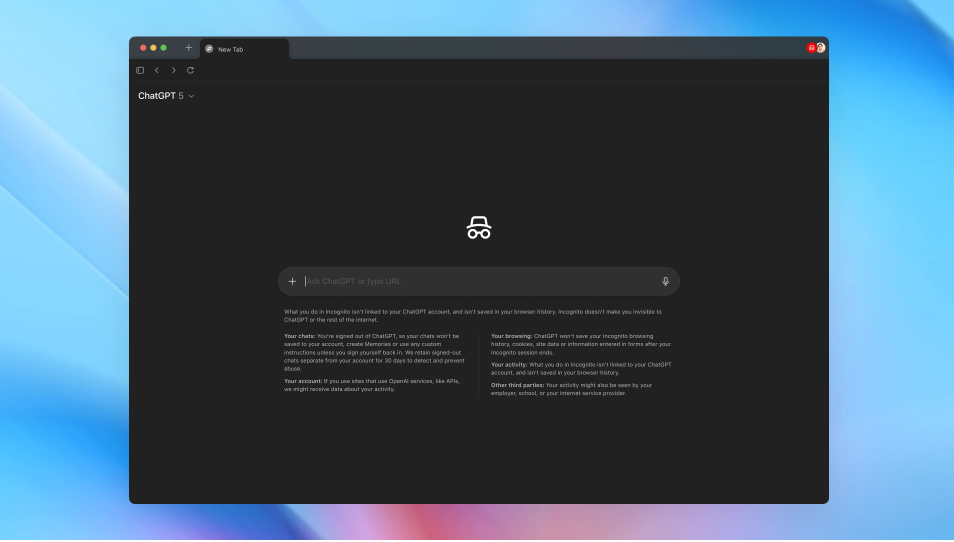
With all this amazing AI power, you might be wondering about privacy. OpenAI has thought of that too! Like ChatGPT, Atlas offers full incognito mode, memory controls, and parental settings with transparency around what's remembered.
This means you have complete command over your digital footprint. If you want to browse without Atlas remembering your activity, incognito mode is there for you. You can also fine-tune what information Atlas remembers and what it forgets, putting you squarely in the driver's seat.
Most importantly, OpenAI has made a very clear commitment: your browsing content is not used to train AI models, and you can disable memory features to maintain complete control over your data.
This commitment is incredibly important, reassuring users that their personal browsing habits and sensitive information will not be used to further develop the AI without their explicit consent. Atlas is designed to serve *you*, not to learn from your private data for broader AI development, offering a secure and respectful browsing environment.
Natural Language Commands: Talk to Your Browser!
Gone are the days of needing to learn complex commands or hunt for specific buttons. The browser accepts natural language instructions, allowing you to interact with it conversationally rather than through traditional interface elements.
You can simply talk or type to Atlas as you would to a friend. “Find me the best pizza place nearby,” “Summarize this article about quantum physics,” or “Book me a table for two at 7 PM on Friday.” The browser understands your everyday language, making interaction seamless and intuitive. This makes the power of AI accessible to everyone, regardless of their technical know-how.
Inline Writing Help: Your Personal Editor
Whether you're writing an email, a social media post, or a school report, getting your words just right can sometimes be a challenge. With Atlas, help is always at hand. Atlas provides integrated writing assistance directly within the browser interface, helping you edit and improve text as you compose.
This isn't just a spell checker; it's a smart AI editor that can offer suggestions for grammar, style, tone, and even help you rephrase sentences to be clearer or more impactful. Imagine writing an important email and having Atlas gently suggest improvements that make your message shine! This feature makes everyone a better writer, enhancing communication and confidence right where you type.
Getting Your Hands on Atlas: Availability and Future Plans
So, how can you experience this incredible revolution in web browsing? Currently, ChatGPT Atlas is available exclusively for macOS users.
This means if you have a Mac computer, you're among the first who can dive into this new world.
Access is limited to ChatGPT Plus, Pro, and Business subscribers, with the browser in preview status.
This early access allows OpenAI to gather valuable feedback from its most dedicated users, ensuring that Atlas evolves into the best possible tool for everyone. But don't worry if you're not on macOS or a subscriber yet! Windows, iOS, and Android support are confirmed as coming soon.
This means that soon, users across a wide range of devices will be able to harness the power of Atlas, whether they're on a desktop, laptop, tablet, or smartphone. The future of browsing is indeed expanding to everyone! Users eager to begin their Atlas adventure can download it directly from chatgpt.com/atlas.
Get ready to download and transform your digital world!
Real-World Wonders: Practical Use Cases for ChatGPT Atlas
The true beauty of ChatGPT Atlas lies in its ability to transform nearly every aspect of our daily digital lives. It's not just a tool for tech enthusiasts; it's a productivity powerhouse for everyone. Let's look at some exciting ways Atlas will make your life easier and more productive:
-
- *For Research and Fact-Checking:* Imagine you're writing a school report or working on a big project. You can verify information without opening additional tabs, simply asking Atlas to confirm facts or provide context on the current page.
This speeds up your research immensely and ensures accuracy.
- *For Research and Fact-Checking:* Imagine you're writing a school report or working on a big project. You can verify information without opening additional tabs, simply asking Atlas to confirm facts or provide context on the current page.
-
- *During Job Hunts:* Looking for a new job can be a daunting task. The browser helps compare job postings and company information contextually.
You can ask Atlas to highlight required skills from several postings or quickly summarize a company's mission statement while reading their “About Us” page.
- *During Job Hunts:* Looking for a new job can be a daunting task. The browser helps compare job postings and company information contextually.
-
- *While Shopping:* Tired of endlessly comparing products? Atlas makes shopping a breeze by enabling side-by-side product comparisons.
Ask it to compare the features of two washing machines or find reviews for a new gadget, all without switching windows.
- *While Shopping:* Tired of endlessly comparing products? Atlas makes shopping a breeze by enabling side-by-side product comparisons.
-
- *For Studying and Learning:* Whether you're tackling a new subject or diving into a complex textbook, Atlas provides explanatory chat alongside technical documentation.
Struggling with a math problem on an online tutorial? Ask Atlas to explain the steps. Reading a dense historical text? Get Atlas to simplify difficult passages.
- *For Studying and Learning:* Whether you're tackling a new subject or diving into a complex textbook, Atlas provides explanatory chat alongside technical documentation.
-
- *During Deep Research Projects:* For those engaged in extensive information gathering, Atlas manages complex information gathering by helping you organize thoughts, summarize findings, and keep track of sources across many different web pages.
- *For Content Consumption:* Beyond just reading, Atlas can summarize videos and lengthy articles, so you can quickly grasp the main points of a YouTube lecture or a long-form news piece, deciding if you want to invest more time in it.
The browser essentially converts the web into a collaborative workspace where the AI understands your goals, remembers what matters to you, and helps you take action—all while maintaining your privacy and keeping everything within a single, unified interface.
It’s a bold step forward in making the internet not just a place to find information, but a dynamic, intelligent partner in your daily endeavors. ChatGPT Atlas empowers you to navigate the digital world with unprecedented ease and intelligence, transforming every online interaction into a more meaningful and efficient experience.
The Dawn of a New Digital Era
The launch of ChatGPT Atlas marks a pivotal moment in the history of the internet. It's not just an improvement on existing browsers; it's a fundamental shift in how we interact with the vast ocean of information and tasks that the web presents. By embedding a powerful AI assistant directly into the browsing experience, OpenAI has created a tool that truly understands, assists, and empowers its users.
From saving precious minutes every day with its “Ask ChatGPT” sidebar to autonomously managing complex tasks with Agent Mode, Atlas is designed to make your digital life smoother, smarter, and more exciting. Its commitment to privacy, context-aware intelligence, and seamless integration of writing assistance all point to a future where our online tools are truly collaborative partners.
As ChatGPT Atlas rolls out to more users and platforms, we can only begin to imagine the full scope of its impact. This isn't just about faster browsing; it's about unlocking new potentials for learning, working, and exploring the world. Get ready to experience the internet like never before, because with ChatGPT Atlas, the future of web browsing has officially arrived, and it's absolutely thrilling!
Frequently Asked Questions
What is ChatGPT Atlas and when was it launched?
ChatGPT Atlas is OpenAI's AI-powered web browser, launched in October 2025, integrating ChatGPT directly into the browsing experience.
What is Agent Mode in ChatGPT Atlas?
Agent Mode (currently in preview) allows Atlas to autonomously perform tasks like research, planning, and booking across multiple tabs, under user supervision, with privacy safeguards.
Is ChatGPT Atlas available for all operating systems?
Currently, it's exclusively available for macOS users who are ChatGPT Plus, Pro, or Business subscribers. Windows, iOS, and Android support are confirmed to be coming soon.
How does ChatGPT Atlas protect user privacy?
Atlas offers full incognito mode, memory controls, and parental settings. OpenAI commits that browsing content is *not* used to train AI models, and users can disable memory features for complete data control.
What are the main benefits of using ChatGPT Atlas over a traditional browser?
Atlas offers real-time, context-aware AI assistance, saving time by summarizing content, comparing products, providing inline writing help, and enabling task automation, all within a unified interface.