


Build AI Agents with ChatGPT: Complete Guide
Estimated reading time: 12 minutes
Key Takeaways
- Learn to build an AI agent with ChatGPT using the OpenAI API for its core intelligence.
- Essential tools include **programming languages** like Python, **frameworks** (like LangChain, AutoGPT), and hosting services.
- Follow a step-by-step guide from defining your agent's *superpower* to deployment and monitoring.
- No-code/low-code Agent Builders offer visual, drag-and-drop interfaces for simpler creation.
- Enhance your agent with *custom training* data and configure its unique tone and boundaries for reliable interactions.
- AI agents offer diverse *use cases* in customer support, personal productivity, data automation, and knowledge work.
- Dive deeper with OpenAI's tutorials and practical guides to master advanced agent building techniques.
Table of contents
- Unleash Your Inner AI Wizard: A Step-by-Step Guide on How to Build an AI Agent with ChatGPT!
- Key Takeaways
- What Exactly IS an AI Agent? Imagine a Super-Smart Helper!
- Why Build Your AI Agent with ChatGPT? The Power is in Your Hands!
- The Essential Toolbox: What You'll Need for Your AI Agent Adventure
- Your Adventure Map: A Step-by-Step Guide on How to Build an AI Agent with ChatGPT!
- Step 1: Define Your Agent's Superpower! (What will it do?)
- Step 2: Get Connected to ChatGPT's Brain! (Set Up OpenAI's API)
- Step 3: Teach Your Agent to Think! (Develop the Core Logic)
- Step 4: Make Your Agent Smarter and Safer! (Fine-Tune and Connect to External Data)
- Step 5: Give Your Agent a Friendly Face! (Develop User Interaction Channels)
- Step 6: Test, Test, Test! (Test & Debug Your Agent)
- Step 7: Launch Your Agent into the World! (Deploy & Monitor)
- Visual Workflow Magic: Building Your Agent Without Lots of Code!
- Making Your Agent Super Special: Custom Training and Personality!
- What Can Your AI Agent Do? Amazing Use Cases!
- Your AI Agent's Toolbox: Key Frameworks and Tools
- Explore More: Dive Deeper into AI Agent Building!
- The Future is Now: Your AI Agent Adventure Awaits!
- Frequently Asked Questions
Hey there, future tech explorers! Get ready for a thrilling adventure into the world of Artificial Intelligence! Have you ever dreamed of creating your very own smart helper, a digital friend that can do amazing tasks for you, like answering questions, scheduling your day, or even writing reports? Well, guess what? That dream is closer than you think! Today, we’re going on an exciting journey to discover how to build an AI agent with ChatGPT – it's like teaching a computer to think and act almost like magic!
Imagine having a super-smart assistant that never gets tired, always remembers everything, and can connect with all sorts of online tools to help you out. This isn't just science fiction anymore; it's something you can learn to create right now! The world of AI is buzzing with possibilities, and building your own AI agent with the incredible power of ChatGPT is one of the most exciting new skills you can learn. It's a bit like giving your computer a brain and teaching it to be helpful in countless ways.
So, buckle up, because we're about to dive deep into the fascinating process of building these clever digital helpers. We'll explore everything from the special tools you'll need to a step-by-step guide that will light up your path. Get ready to feel the thrill of creation as we uncover the secrets of how to build an AI agent with ChatGPT!
What Exactly IS an AI Agent? Imagine a Super-Smart Helper!
Before we jump into building, let's make sure we understand what an “AI agent” really is. Think of an AI agent as a super-smart computer program that can understand what you want, think about the best way to do it, and then actually go and do it! It's not just a chatbot that replies to your questions; it's a program that can take action.
An AI agent can:
- Understand you: Like when you ask it to “find me a recipe for chocolate chip cookies.”
- Think for itself (a little bit!): It figures out that it needs to search the internet for recipes.
- Take action: It then shows you a list of recipes or even reads one out loud!
When we talk about building an AI agent with ChatGPT, we're giving our agent one of the most powerful “brains” available. ChatGPT is amazing at understanding human language and generating incredibly helpful and creative responses. By connecting our agent to ChatGPT, we're giving it the power to communicate, reason, and solve problems using words, just like a human would! It's like giving your agent the gift of gab and a super-brain all at once.
Why Build Your AI Agent with ChatGPT? The Power is in Your Hands!
So, why choose ChatGPT as the brain for your AI agent? The answer is simple: ChatGPT is incredibly versatile and powerful! It can understand complex questions, write creative stories, summarize long articles, and much more. By using ChatGPT, you're tapping into a vast ocean of knowledge and language skills.
Building an AI agent with ChatGPT means you can create tools that:
- Talk like a human: Your agent will sound natural and friendly.
- Learn and adapt: With a little help, it can get better at its tasks over time.
- Connect to the world: It can use its smarts to interact with other apps and websites.
It's truly an exciting time to be alive, where tools like ChatGPT make it possible for almost anyone to start tinkering with AI and creating something truly useful. Your imagination is the limit when you learn how to build an AI agent with ChatGPT!
The Essential Toolbox: What You'll Need for Your AI Agent Adventure
Every great builder needs great tools! To successfully build an AI agent with ChatGPT, you'll gather a collection of special tools and technologies. Don't worry if some of the names sound a bit tricky; we'll break them down simply. Think of them as the hammers, screwdrivers, and blueprints for your digital creation.
-
- OpenAI API (ChatGPT): The Brain of Your Agent!
This is the most important tool! The OpenAI API (that's short for Application Programming Interface) is how your agent talks to ChatGPT. It provides the core intelligence and conversational ability for your agent. Think of the API as a special telephone line that lets your agent send messages to ChatGPT's super-smart brain and get answers back. Without it, your agent wouldn't know how to think or talk! - Programming Languages: Giving Instructions to Your Agent!
Just like you learn English or another language to talk to people, computers understand special languages too. When you build an AI agent with ChatGPT, you'll typically use programming languages like Python or JavaScript. These languages are how you write the rules and instructions for your agent – what it should do, when it should do it, and how it should use ChatGPT's brain power. Python is often a favorite because it's known for being quite easy to read and understand, even for beginners! - Frameworks/Platforms: Building Blocks for Smart Agents!
Imagine trying to build a LEGO castle without any special blocks, just tiny individual bricks. It would take forever! Frameworks like LangChain, AutoGPT, and AgentGPT are like those special LEGO blocks. They help you chain together different tasks and connect your agent to other tools and databases more easily. They give you pre-made structures and rules that make building complex agents much simpler and faster. - Hosting: A Home for Your AI Agent!
Once your agent is built, it needs a place to live and run constantly so it can always be ready to help! This is where hosting services come in. These are big computer servers in the cloud (which just means they're online and accessible from anywhere). Popular examples include AWS, Google Cloud, Azure, or Heroku. They provide the power and space for your AI agent to work its magic 24/7. - Integration/Automation Tools: Connecting Your Agent to the World!
What if your AI agent needs to send an email, update a spreadsheet, or post something on social media? That's where integration and automation tools like Zapier or Make.com become super handy. These tools act like bridges, allowing your AI agent to connect with hundreds of other apps and services online. This expands what your agent can do far beyond just talking!
- OpenAI API (ChatGPT): The Brain of Your Agent!
- Monitoring Tools: Keeping an Eye on Your Agent!
Even the smartest agents can sometimes get confused or run into problems. Tools like Prometheus and Grafana help you keep an eye on how your agent is performing. They're like health monitors, telling you if your agent is working well, if it's responding quickly, or if it needs some adjustments. This ensures your agent is always at its best!
With these tools in your arsenal, you're well-equipped to embark on your exciting journey to build an AI agent with ChatGPT!
Your Adventure Map: A Step-by-Step Guide on How to Build an AI Agent with ChatGPT!
Now for the really exciting part – the actual steps! Building an AI agent might sound complicated, but we'll break it down into easy-to-understand steps, like following a treasure map. Each step brings you closer to creating your very own smart digital helper.
Step 1: Define Your Agent's Superpower! (What will it do?)
Before you start coding or connecting anything, you need to decide what your AI agent will be *good* at. What problem will it solve? What tasks will it perform?
- Clearly specify what problem the agent should solve. Will it be a customer support helper, answering common questions for a business? Will it be a personal assistant that schedules your meetings? Or maybe a report generator that gathers information for you?
- Think about its “use case.” What kind of information will it need to do its job? What special abilities (functionalities) will it require? For example, if it's a customer support agent, it needs to understand questions about products. If it's a scheduler, it needs to know how to look at calendars and add appointments. This first step is like giving your agent its mission!
Step 2: Get Connected to ChatGPT's Brain! (Set Up OpenAI's API)
Now that you know what your agent will do, it's time to connect it to the source of its intelligence: ChatGPT!
- Sign up at OpenAI for API access and obtain an API key. This API key is like a secret password that lets your computer program talk to ChatGPT's systems. Keep it safe!
- Next, you'll configure authentication in your development environment. This just means you tell your computer program how to use that secret API key to prove it's allowed to talk to OpenAI.
- You'll then use REST API calls or an official OpenAI SDK (Software Development Kit) in languages like Python or Node.js to actually send messages to ChatGPT. These are the specific instructions you write in your programming language to ask ChatGPT a question and get its answer. It’s the direct line to the brain!
Step 3: Teach Your Agent to Think! (Develop the Core Logic)
This is where you build the “rules” for your agent – how it processes information and decides what to do.
- You'll set up input handling, user intent recognition, and response generation. This means teaching your agent to understand what a user is asking (input handling), figure out what the user *really* wants (intent recognition), and then create a helpful answer (response generation).
- You'll design logic using if/else branches, loops, and approvals as needed. Think of these as pathways in your agent's brain: “IF the user asks about the weather, THEN look up the weather. ELSE IF they ask about news, THEN find news.”
- You can also use frameworks like LangChain to bring together various chains of reasoning and tool usage. LangChain helps you connect different parts of your agent's thinking process, like understanding a question, then searching for information, then summarizing it, all in one smooth flow.
- Here's a tiny example in Python that shows how your code might ask ChatGPT a question:
import openai

# This part sends a message to ChatGPT asking about the weather
response = openai.ChatCompletion.create(
    model="gpt-4", # This tells it to use a very smart version of ChatGPT
    messages=[{"role": "user", "content": "What’s the weather today?"}] # This is your question!
)

# This part prints out the answer ChatGPT gives you
print(response["choices"][0]["message"]["content"])
This simple code snippet is a tiny peek into how your agent will “talk” to ChatGPT to get answers. It's truly a magical connection!
Step 4: Make Your Agent Smarter and Safer! (Fine-Tune and Connect to External Data)
This step is optional, but it makes your agent much more powerful and accurate!
- You can fine-tune ChatGPT if you need more domain-specific responses. This means you can teach ChatGPT about *your specific* business, products, or special topics by uploading your own data or customer interaction logs. It's like giving ChatGPT a special textbook about your particular needs.
- You can also connect your agent to internal APIs or databases for real-time, context-aware responses. This means your agent can look up current information, like today's schedule, how much of a product is in stock, or customer details, to give truly accurate and helpful answers. It's like giving your agent access to a secret library of up-to-the-minute information!
- Importantly, you should also incorporate guardrails for safety—PII removal, moderation, etc. This is like putting safety rules in place. It ensures your agent doesn't accidentally share private information (like phone numbers or addresses) or say anything inappropriate. Safety is always a top priority!
Step 5: Give Your Agent a Friendly Face! (Develop User Interaction Channels)
Your agent needs a way to talk to people! This is where you build the “face” or “voice” of your agent.
- You can build a front end: a web/chat UI, a Slack app, or a WhatsApp bot. This could be a simple chat window on a website, an app that works inside Slack (a popular team communication tool), or even a bot that responds to messages on WhatsApp.
- You then link your agent's backend logic to the user interface using APIs/frameworks. This means connecting the “brain” you built in Step 3 to the “face” you built in Step 5, so when someone types a message into the chat window, your agent's brain can receive it, process it, and send a reply back to the chat window. It's like connecting the mouth to the brain!
Step 6: Test, Test, Test! (Test & Debug Your Agent)
No invention is perfect on the first try! Testing is super important to make sure your agent works just right.
- Simulate user inputs to check understanding and stability. You'll pretend to be different users and ask your agent all sorts of questions, trying to trick it or find its weak spots.
- You'll then adjust decision logic, prompts, and integrations to optimize performance. This means tweaking your agent's rules, changing the way you ask ChatGPT questions (these are called “prompts”), and making sure all the connections to other tools are working perfectly. This stage is all about making your agent as smart and reliable as possible!
Step 7: Launch Your Agent into the World! (Deploy & Monitor)
Once your agent is tested and polished, it's time to unleash it!
- You'll host your solution on the cloud or via an app framework. This is where you use those hosting services we talked about earlier (like AWS or Google Cloud) to get your agent running live for everyone to use.
- Finally, you'll use logging, error tracking, and analytics tools to monitor for performance and issues. Even after launch, you'll want to keep an eye on your agent. Are people using it? Is it responding quickly (no “latency”)? Is it sometimes making mistakes or saying strange things (“hallucinations”)? These tools help you understand how your agent is doing and make sure it continues to work flawlessly. It's like making sure your newly launched rocket stays on course!
And there you have it! Seven exciting steps to build an AI agent with ChatGPT. Each step is a building block in creating something truly amazing!
Visual Workflow Magic: Building Your Agent Without Lots of Code!
What if you're excited about building an AI agent but don't want to write tons of computer code? Great news! Modern Agent Builders make it much easier, even for beginners.
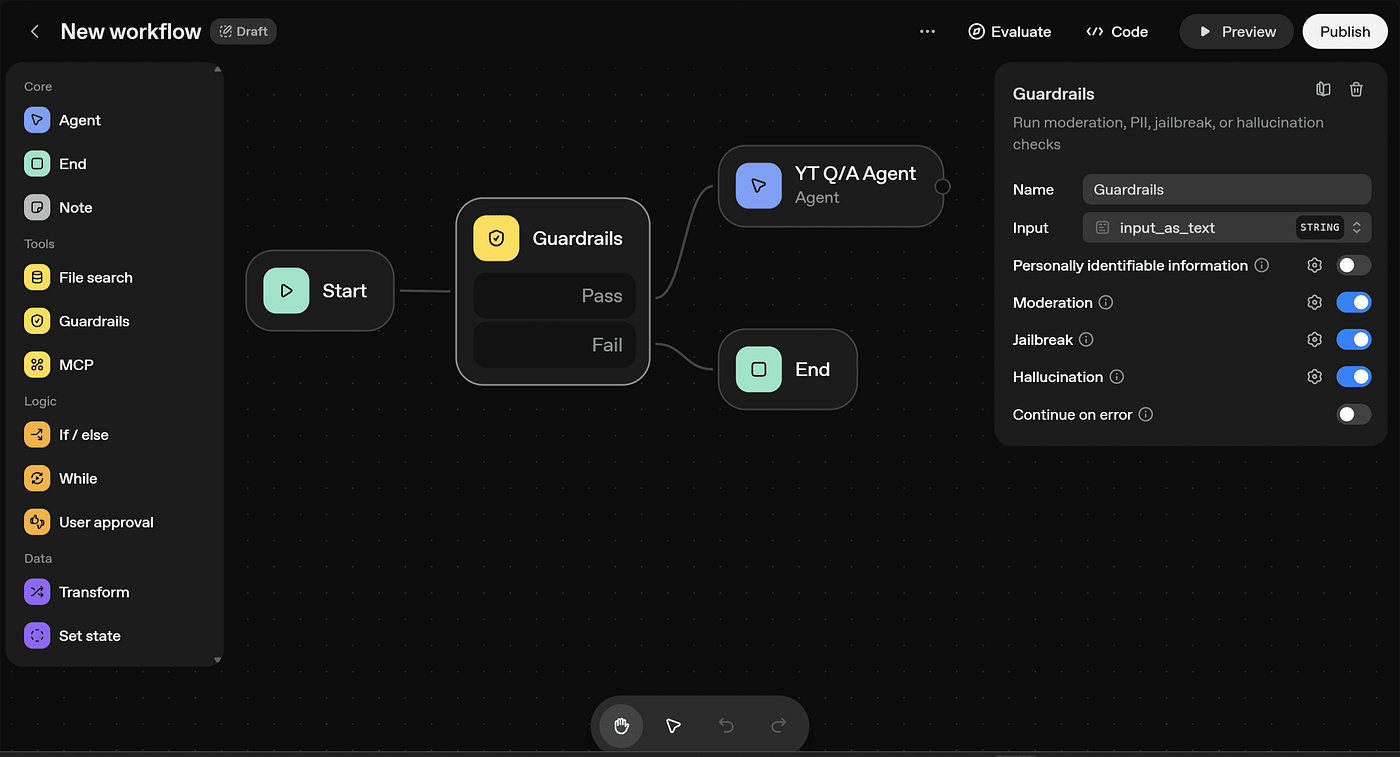
- Tools like OpenAI’s own Agent Builder or Jotform’s visual builder provide drag-and-drop interfaces. Imagine building your agent by dragging colorful blocks around on a screen, each block representing a part of your agent's brain or action.
- You can organize your agent's logic as workflow “nodes,” which are like little connected boxes. These nodes can include things like “Start,” “logic branching” (where the agent makes a decision), “guardrails” (safety checks), “tool integration” (connecting to other apps), “looping” (doing a task over and over), “approval” (asking for a human's OK), “data transformation” (changing data around), and “state management” (remembering what happened before).
- This visual approach can greatly simplify creating, customizing, and scaling your agent—even with minimal code. It's like having a smart assistant to help you build an AI agent with ChatGPT!
Making Your Agent Super Special: Custom Training and Personality!
You can make your AI agent truly unique and perfectly suited to its job by giving it special training.
- You can plug in your SOPs (Standard Operating Procedures), FAQs (Frequently Asked Questions), knowledge bases, or customer support logs. This fine-tunes your agent's responses for amazing accuracy. Imagine giving your agent all the company handbooks and customer service notes so it knows exactly what to say!
- You can also configure its tone, boundaries, and context retention for tailored, reliable interactions. This means you can decide if your agent should be super formal, friendly and casual, or something in between. You can set rules for what it *can't* talk about (boundaries), and make sure it remembers parts of your conversation (context retention) so it doesn't forget what you just talked about. It's like giving your agent a unique personality and excellent memory!
What Can Your AI Agent Do? Amazing Use Cases!
Once you learn how to build an AI agent with ChatGPT, a world of possibilities opens up! These intelligent helpers can do so many incredible things, making life easier for businesses and individuals alike.
Here are some common and exciting ways AI agents are being used:
-
- Customer Support: Imagine an AI agent that can act as an automated helpdesk, answering common questions instantly, helping customers solve problems, or even chatting live to guide them through a process. This means faster help for everyone!
-
- Personal Productivity: Wouldn't it be cool to have an agent that manages your schedule, sends you reminders about important tasks, or helps you organize your documents? It's like having a super-efficient personal assistant that keeps you on track.
-
- Data Automation: AI agents can be brilliant at handling data. They can generate detailed reports from complex information, keep inventory lists updated in real-time, or even provide instant insights from sales figures. This saves tons of time and makes sure information is always fresh.
- Knowledge Work: For tasks that involve lots of information, an AI agent can be a research assistant, quickly looking up data, summarizing long articles, or even helping you write reports by finding all the facts you need. It's like having a super-fast librarian and researcher rolled into one!
The potential for these agents is truly mind-blowing, and by knowing how to build an AI agent with ChatGPT, you're at the forefront of this amazing revolution!
Your AI Agent's Toolbox: Key Frameworks and Tools
To help you keep track of all the incredible tools and frameworks we've discussed, here's a quick summary. Think of this as your cheat sheet for building your AI agent dream team!
| Tool/Framework | What it Does for Your AI Agent |
|---|---|
| OpenAI ChatGPT API | Gives your agent its natural language understanding and smart conversation abilities. It's the brain! |
| LangChain | Helps your agent connect different steps of thinking and remember things across conversations. |
| AutoGPT/AgentGPT | Allows your agent to break down big tasks into smaller steps and get them done all by itself. |
| Jotform, Agent Builder | Provides easy-to-use drag-and-drop tools to build agents without writing a lot of code. |
| Zapier, Make.com | Connects your agent to hundreds of other apps and services, so it can send emails, update spreadsheets, etc. |
| Prometheus/Grafana | Helps you watch how well your agent is working and catch any problems quickly. |
Explore More: Dive Deeper into AI Agent Building!
The journey of learning how to build an AI agent with ChatGPT is an ongoing adventure! There are always new things to discover and new ways to make your agents even smarter. If you're excited to learn even more, here are some fantastic resources:
- OpenAI’s agent builder tutorials are a treasure trove of information! You can find videos on YouTube and detailed guides directly from OpenAI. These resources show you visual ways to craft workflows, add logic, evaluate how well your agent is doing, and finally publish your amazing agents. They are perfect for both visual learners and those who love to read step-by-step instructions.
- You can also find practical PDF guides and detailed blogs from top tech firms. These resources often outline industry-standard agent architectures (the way smart agents are typically built) and clever testing strategies (how to make sure your agent is super reliable). They offer insights from experts in the field, helping you build truly world-class AI agents.
These resources are your next steps on the path to becoming an AI agent master!
The Future is Now: Your AI Agent Adventure Awaits!
Wow, what an incredible journey we've been on today! We've uncovered the thrilling secrets of how to build an AI agent with ChatGPT, from understanding its core purpose to deploying it out into the digital world. It's clear that building an AI agent with ChatGPT brings together the magic of API integration, clever logic design, and the power of tailored data to create truly remarkable tools.
This process scales from simple drag-and-drop builders, perfect for rapid prototyping and getting started quickly, to robust, fully custom solutions that use modern frameworks and powerful cloud tools. This means whether you're just starting out or you're a seasoned coding wizard, there's a path for you to create something amazing.
AI agents are not just a cool idea anymore; they are now being used for a wide range of business and personal automation tasks, changing how we work, learn, and live. And the most exciting part? The growing ecosystem of no-code and low-code platforms is making these incredible tools accessible for non-developers as well as experienced engineers. This means more and more people can join the fun and create their own smart helpers!
So, what are you waiting for? The power to create your own intelligent digital helper is within your grasp. It's time to unleash your creativity, embrace the adventure, and truly understand how to build an AI agent with ChatGPT! The future is calling, and your AI agent is ready to be born!
Frequently Asked Questions
- What exactly is an AI agent?
An AI agent is a smart computer program that can understand your requests, make decisions, and take actions to complete tasks, going beyond just answering questions.
- Why should I build my AI agent with ChatGPT?
ChatGPT provides your agent with powerful natural language understanding, creative response generation, and versatile problem-solving capabilities, making your agent intelligent and human-like in conversation.
- What programming languages are typically used for building AI agents with ChatGPT?
Commonly, Python and JavaScript are used, with Python often preferred for its readability and extensive AI libraries.
- Can I build an AI agent without extensive coding knowledge?
Yes! Tools like OpenAI's Agent Builder or Jotform's visual builder offer no-code/low-code drag-and-drop interfaces that simplify the process for beginners.
- What are some common applications for AI agents?
AI agents can be used for customer support, personal productivity (e.g., scheduling), data automation (e.g., report generation), and knowledge work (e.g., research and summarization).