Stop Wasting Power: Build an AI-Optimized Home Energy System with Smart Plugs & Energy Monitors

Stop Wasting Power: Build an AI-Optimised Home Energy System with Smart Plugs & Energy Monitors
Are you tired of opening your electricity bill only to be shocked by the total? Many homeowners feel powerless, watching costs rise without knowing exactly where their money is going. The culprits are often hidden in plain sight: “energy vampires” that silently drain power on standby, inefficient appliances running at the worst times, and a general lack of visibility into real-time consumption. Simply waiting for a monthly statement is a reactive approach that leaves you a step behind.
The solution is to build a proactive, intelligent system that puts you in control. By combining a whole-home energy monitor with individual smart plugs that track energy usage, you can create a complete picture of your home's power flow. This guide will show you how to set up an AI-optimised system using home energy monitor smart plugs. We'll go beyond simple tracking and dive into creating automations that actively learn your habits, manage high-load devices like EV chargers, and ultimately help you reduce electricity bills.
Solution Overview – How the System Works as a Whole
An AI-optimised home energy system transforms passive appliances into an active, intelligent network. It’s built on a foundation of data and automation, with four key components working in concert:
- Whole-Home Energy Monitor: This is the “big picture” device. Installed in your main electrical panel, it clamps onto the main power lines to measure the total electricity your entire house is using in real-time. This provides the baseline and overall context for your energy consumption.
- Energy-Monitoring Smart Plugs: These are the granular data points. You place them between the wall socket and individual high-consumption or problematic appliances (like your entertainment centre, computer setup, or a space heater). They report exactly how much power that specific device is using.
- Smart EV Charger (Optional): For electric vehicle owners, this is a critical component. A smart charger integrates into the system, allowing you to control and schedule the single largest energy draw in most homes.
- Central Hub / AI Brain: This is the software that brings it all together, such as Home Assistant, SmartThings, or another automation platform. It collects data from the whole-home monitor and all the smart plugs. Here, you define the rules and AI logic. The hub analyses the incoming data and sends commands back to the smart plugs and EV charger to turn them on or off based on your pre-set conditions, saving energy automatically.
The data flows from the monitors to the hub, which then makes decisions—like shutting down an idle entertainment system or scheduling your EV to charge only during off-peak hours—to create a truly efficient and automated home.
Core Device Types You Need
To build this system, you need a few key types of hardware. Each plays a distinct but complementary role in gathering data and enabling control.
Whole-Home Energy Monitors
A whole-home monitor is the cornerstone of your energy management system, giving you a top-level view of your consumption. It tells you your total power draw at any given moment.
- Why it matters: It provides the context for all other automations. You can set rules based on your total household usage, such as “don't start the EV charger if the house is already drawing over 5kW”.
- Real-time feedback: See the immediate impact of turning on an oven or air conditioner on your overall consumption.
- Identify mystery drains: If your baseline power usage is high even when you think everything is off, a whole-home monitor helps you start the investigation.
- Safety and compatibility: Look for UL or ETL-certified devices that are compatible with your home's specific electrical panel and system type.
Energy-Monitoring Smart Plugs
While the whole-home monitor provides the macro view, energy-monitoring smart plugs give you the micro view. These plugs don't just make a device smart; they measure its specific power consumption.
- Why it matters: They pinpoint exactly which devices are the “energy vampires” or the most inefficient.
- Granular control: You can create automations for a single device or a group of devices, like “turn off the entire office setup 30 minutes after the computer's power draw drops to zero”.
- Verification: Confirm that your “energy-efficient” appliances are actually living up to their claims.
- What to look for: Ensure the plug explicitly states “energy monitoring” as a feature. Check its power rating (e.g., 15A) to make sure it can handle the appliance you intend to connect.
Smart EV Chargers
For those with an electric vehicle, managing its charging schedule is one of the most impactful ways to control your electricity bill. An EV is often the single largest consumer of power in a household.
- Why it matters: A smart charger allows you to shift a massive electrical load to the most cost-effective times.
- Off-peak scheduling: Automate charging to only occur during overnight hours when electricity rates are typically at their lowest.
- System integration: A connected charger can communicate with your central hub, allowing for advanced logic like “only charge using excess solar power” or “pause charging if the home's total usage spikes”.
- What to look for: Choose a charger compatible with your vehicle's connector (J1772 or NACS), ensure it is UL-certified for safety, and verify its integration capabilities with your chosen smart home platform.
Devices Used in This Guide (Selected Products)
Emporia Vue 3 Home Energy Monitor – Smart Home Automation Module and Real Time Electricity

The Emporia Vue 3 serves as the central brain for understanding your home's overall power consumption. Installed directly in your electrical panel, it provides the crucial, high-level data needed to make intelligent automation decisions. Its ability to monitor the entire home makes it the starting point for identifying broad energy waste patterns.
- Provides accurate, real-time tracking of your entire home's electricity usage.
- Installs easily on most circuit panels using non-invasive clamp-on sensors.
- Certified and UL Listed for safety and reliability within your electrical system.
- The companion app offers continuous energy monitoring and detailed usage data to help manage costs.
Sense Energy Monitor – Track Electricity

The Sense Energy Monitor is another powerful option for whole-home monitoring, offering detailed insights to help lower consumption. It excels at identifying individual appliance signatures from the main power feed, helping you understand when specific devices like your fridge or washing machine are running without needing a dedicated plug for each one.
- Provides real-time monitoring of your home's power use to help reduce utility bills.
- Supports time-of-use rate plans for more efficient energy management.
- Uses iOS, Android, and web apps to send alerts and track specific appliance activities.
- Helps you discover what devices were left on and understand their impact.
Emporia Vue 3 Home Energy Monitor – Smart Home Automation Module and Real Time Electricity Usage Monitor
This version of the Emporia Vue 3 is designed for homeowners who want both whole-home and individual circuit tracking. By adding sensors to specific breakers, you can get a more detailed breakdown of consumption from major systems like your HVAC or water heater, complementing the data from smart plugs on smaller appliances.
- UL Listed energy monitor for safe and reliable real-time tracking.
- Installs in most residential electrical panels with clamp-on sensors.
- Monitors whole-home energy consumption as well as individual appliances for enhanced management.
- Supports a variety of electrical system types for broad compatibility.
P-Link 𝗧𝗮𝗽𝗼 Smart Plug Wi-Fi Mini, Energy Monitoring

The Tapo Smart Plug is an excellent choice for granular device monitoring. Its primary role is to track the power consumption of a specific appliance, providing the detailed data needed for targeted automations. Use it on devices like dehumidifiers, portable heaters, or kitchen appliances to understand their true cost and control their operation.
- Provides comprehensive energy monitoring with clear statistics and charts.
- Programmable scheduling allows devices to run during off-peak hours for cost savings.
- Smart charging and auto-shutoff technologies protect devices from overcharging.
- Compatible with Alexa and Google Assistant for convenient voice control.
Kasa Smart Plug Mini 15A, Smart Home Wi-Fi Outlet

The Kasa Smart Plug Mini is a versatile workhorse for making standard appliances smart. While its main feature is remote control and scheduling, it can be paired with a whole-home monitor to indirectly manage energy. You can use data from your Emporia or Sense to trigger this plug, for example, turning off a fan when overall energy use is high.
- Compact design fits easily into any space without blocking adjacent outlets.
- Works seamlessly with Alexa and Google Home for voice commands.
- Manage appliances remotely through the Kasa app from anywhere.
- Connects directly to a 2.4GHz Wi-Fi network for simple setup.
Kasa Smart Plug Ultra Mini 15A, Smart Home Wi-Fi Outlet

Similar to the Mini, the Kasa Ultra Mini provides reliable smart control in an even smaller form factor, ensuring it won't obstruct other sockets. It's perfect for adding automation to lamps, chargers, or other small electronics as part of your broader energy-saving strategy, responding to commands from your central hub.
- Enables hands-free control of home electronics through Amazon Alexa and Google Assistant.
- Rated for 15 Amps, making it suitable for a wide variety of household devices.
- Easy setup and remote control via the Kasa app on a 2.4GHz Wi-Fi network.
- Ultra-compact design ensures it won't block other outlets.
Kasa Smart Plug Power Strip HS300, Surge Protector with 6 Individually Controlled Smart Outlets and 3 USB Ports

The Kasa HS300 is the ideal solution for managing clusters of electronics, such as an entertainment centre or home office desk. Its key feature is individual outlet control combined with energy monitoring for each socket. This allows you to create powerful automations, like shutting down power to your TV, speakers, and game console when they are in standby mode, eliminating vampire power drain from multiple devices at once.
- 6 smart outlets can be controlled and monitored for energy use individually.
- 3 built-in USB ports for convenient charging of smaller devices.
- ETL-certified surge protection safeguards sensitive electronics from power spikes.
- Compatible with popular voice assistants for seamless voice control.
Kasa Smart Plug Power Strip KP303, Surge Protector with 3 Individually Controlled Smart Outlets and 2 USB Ports

The KP303 power strip is a more compact version perfect for smaller device clusters, like a bedside table or kitchen counter. With three individually controlled smart outlets, you can automate a lamp, a phone charger, and a white noise machine independently, all while protecting them with built-in surge protection. It simplifies cable management and smart control in one package.
-
- Three smart outlets can be controlled independently.
* Two always-on USB ports allow you to power up to five devices at once.
* Includes ETL-certified surge protection for sensitive electronics.
* Works with Alexa and Google Assistant for hands-free voice control.
ChargePoint HomeFlex Level 2 EV Charger J1772

The ChargePoint HomeFlex with a J1772 connector is a versatile Level 2 charger that integrates perfectly into a smart energy system. Its Wi-Fi connectivity allows your central hub to schedule charging sessions for off-peak hours, significantly reducing the cost of refuelling your EV. It's a key component for managing one of the largest electrical loads in your home.
- Dependable and versatile Level 2 EV charging for home use.
- Connects users to a vast network of public charging stations.
- UL-certified for safety and suitable for both indoor and outdoor installations.
- Features a robust, cold-resistant cable for durability in all weather.
ChargePoint HomeFlex Level 2 EV Charger, Hardwired NACS
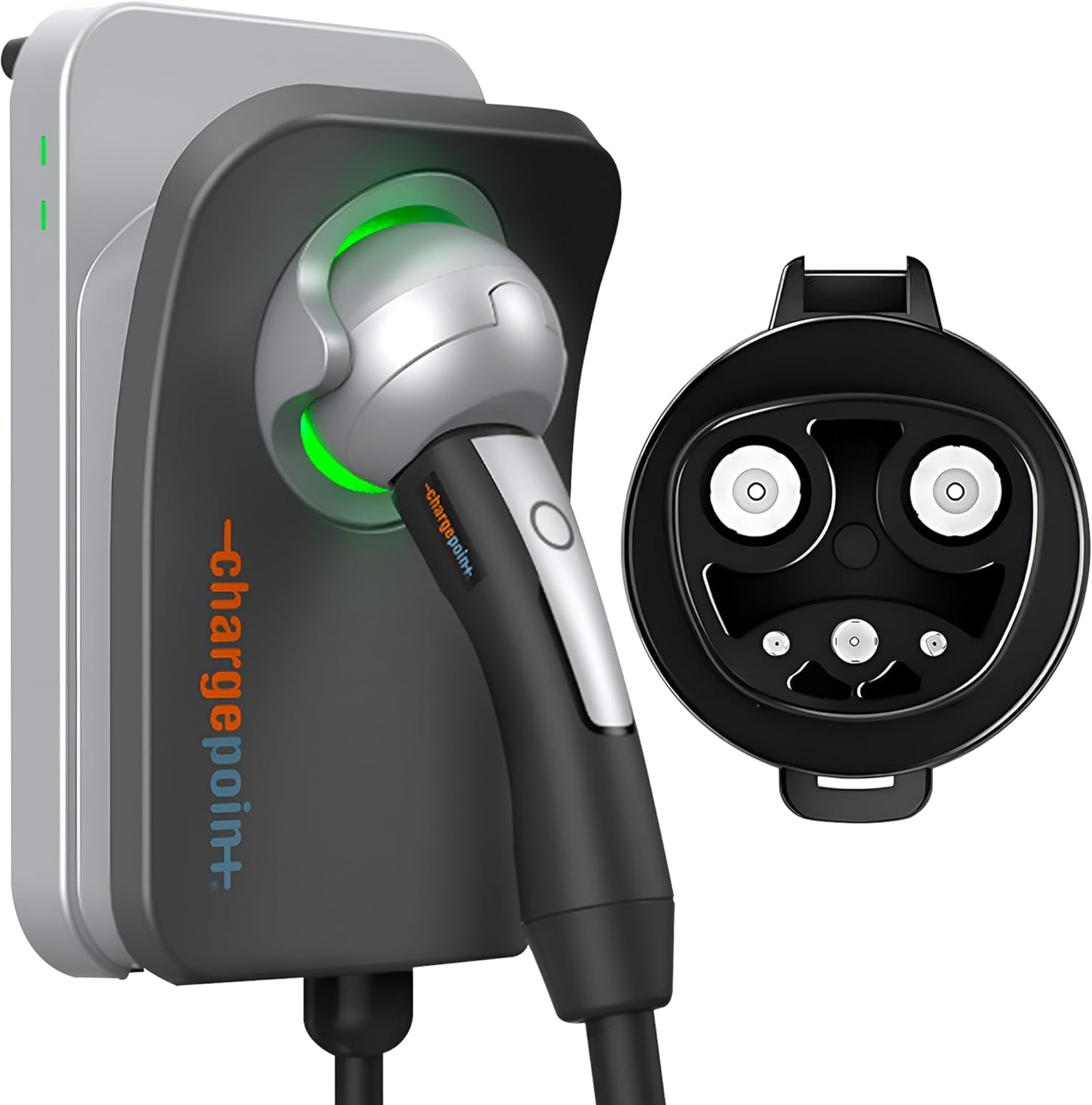
This version of the HomeFlex is specifically designed for Tesla owners, featuring the NACS connector. Like its J1772 counterpart, it enables intelligent energy automation. You can create rules to ensure your Tesla only charges when your overall home energy usage is low or when your solar panels are generating surplus electricity, maximising efficiency and minimising cost.
- Specifically compatible with Tesla models through its NACS connector.
- Supports fast charging speeds of up to 37 miles per hour on a 240-volt supply.
- UL-certified charger designed for both indoor and outdoor use.
- Includes a cold-resistant cable to maintain performance in various weather conditions.
Step-By-Step Setup – From Zero to Working System
Building your AI-optimised energy system is a methodical process. Follow these steps to go from individual components to a fully integrated and automated solution.
- Safety First – Install the Whole-Home Monitor: This step involves working inside your main electrical panel. If you are not 100% comfortable and knowledgeable about electrical safety, hire a qualified electrician. The process involves clamping sensors around the main power feeds coming into your home.
- Set Up the Monitor's Software: Once the hardware is installed, follow the manufacturer's instructions to connect the monitor (e.g., Sense or Emporia Vue) to your Wi-Fi network and configure it using its dedicated app. You should start seeing real-time whole-home energy data on your phone.
- Deploy Your Smart Plugs: Start with the most obvious energy hogs. Install energy-monitoring smart plugs like the Kasa Power Strip on your entertainment centre and home office setup. Use individual plugs like the Tapo Mini for appliances like space heaters, dehumidifiers, or old refrigerators.
- Name Everything Logically: As you add each smart plug to its app (e.g., the Kasa or Tapo app), give it a clear, descriptive name like “Living Room TV” or “Office Computer Strip”. This is crucial for easily identifying devices later in your central hub.
- Install Your Smart EV Charger: Again, this is a job for a professional electrician. Have your ChargePoint HomeFlex installed and connect it to your Wi-Fi network through its app.
- Integrate into a Central Hub: This is where the magic happens. Choose a platform like Home Assistant. Install the necessary integrations or add-ons to connect your Emporia/Sense monitor, Kasa plugs, Tapo plugs, and ChargePoint charger. Your hub will now be able to “see” all the data from these devices in one place.
- Build Your Energy Dashboard: Within your central hub, create a dashboard dedicated to energy. Add gauges and graphs to display total home usage, consumption from each smart plug, and the status of your EV charger. This visual confirmation is key to understanding what's happening.
- Create Your First Simple Automations: Start with easy wins. Create a rule that says, “If the ‘Office Computer Strip' power draw is less than 5 watts for 30 minutes between 10 PM and 6 AM, turn the strip off completely.” This tackles standby power waste.
Example Automation Scenes (AI/Automation Layer)
Once your devices are connected to a central hub, you can move beyond simple schedules and create dynamic, intelligent automations that react to real-world conditions.
Vampire Slaying
This automation targets devices that consume power even when they're turned “off” (standby power). It's perfect for entertainment centres and home offices.
- Trigger: The Kasa HS300 power strip reports that the total power draw from all connected devices (TV, soundbar, console) has been below 10 watts for 20 minutes.
- Condition: The time is between 11 PM and 7 AM.
- Action: The central hub sends a command to the Kasa HS300 to turn all outlets off completely.
- AI Logic: The system can learn your typical usage patterns. If it notices you never use the entertainment centre on Tuesday nights, it might suggest a more aggressive shutdown schedule for that day.
Peak-Shaving
This automation helps you avoid using too much electricity at once, which can be expensive if you're on a time-of-use billing plan.
- Trigger: The Emporia Vue 3 home monitor reports that total household consumption has exceeded 6,000 watts.
- Action 1: Send a notification to your phone: “High energy usage detected! Total consumption is now 6.2kW.”
- Action 2: Dim all non-essential smart lights to 50% brightness.
- Action 3: If a smart plug on a non-critical appliance (like a dehumidifier) is running, turn it off for one hour.
Smart EV Charging
This ensures your electric vehicle charges in the most cost-effective and grid-friendly way possible.
- Trigger: The ChargePoint HomeFlex is plugged into the vehicle after 5 PM.
- Condition 1: The whole-home energy monitor reports total usage is below 2,000 watts.
- Condition 2: The time is within your utility's “off-peak” rate window (e.g., after 10 PM).
- Action: The central hub sends a command to the ChargePoint HomeFlex to begin charging. If total home usage spikes for another reason (like someone starts the oven), the hub can pause the charging until usage drops again.
Common Pitfalls to Avoid
- Ignoring Power Ratings: Do not plug high-draw appliances like large space heaters or air conditioners into a smart plug not rated for that load. Exceeding the 10A or 15A limit is a fire hazard.
- Forgetting About Wi-Fi: Smart plugs and monitors need a stable 2.4 GHz Wi-Fi connection. If your electrical panel or an outlet is in a Wi-Fi dead zone, the device will be unreliable. Plan your network coverage accordingly.
- Buying Non-Monitoring Plugs: Standard smart plugs can only turn devices on and off. For this system, you must purchase plugs that specifically feature “energy monitoring” to get the necessary data.
- Using Non-Certified Devices: Only purchase smart electrical devices that are ETL, UL, or similarly certified for safety in your region. Uncertified electronics pose a significant risk.
- Blocking Outlets: Some older, bulky smart plugs can cover both wall sockets. Opt for mini or ultra-mini designs to ensure you can still use the adjacent outlet.
- Creating Competing Automations: Be careful not to create rules that conflict. For example, one automation turning a plug off while another tries to turn it on can lead to unpredictable behaviour. Keep your logic organised in one central hub.
Best Practices for a Stable, Safe System
- Start Small: Begin with a whole-home monitor and just one or two energy-monitoring plugs for your biggest suspected energy offenders. Learn the system before expanding.
- Use a Consistent Naming Scheme: As mentioned in the setup, a logical naming convention (e.g., “Room – Device”) makes it much easier to manage automations as your system grows.
- Perform Regular Audits: Once a quarter, review your energy dashboard. Are your automations working as expected? Have new energy vampires appeared?
- Secure Your Network: All these devices are on your Wi-Fi network. Ensure you are using a strong, unique password for your Wi-Fi and for any associated cloud accounts.
- Check Physical Connections: Periodically check that smart plugs are firmly seated in their outlets and are not warm to the touch, which could indicate a loose connection or overload.
- Keep Firmware Updated: Manufacturers release firmware updates to fix bugs and patch security vulnerabilities. Enable automatic updates or check for them regularly in the device apps.
- Plan for Manual Overrides: Ensure you and your family know how to manually operate the devices if an automation isn't working correctly or if the network is down. Most smart plugs have a physical power button.
FAQ
- Do I need both a whole-home monitor and smart plugs?
- For the best results, yes. The whole-home monitor gives you the big picture and total usage, while smart plugs pinpoint the specific culprits. You can start with one or the other, but using them together provides the most actionable data.
- How much money can I realistically save?
- Savings vary widely based on your current habits, appliance efficiency, and utility rates. The biggest savings come from identifying and eliminating standby power (which can account for 5-10% of your bill) and shifting large loads like EV charging to off-peak hours.
- Is this system difficult to set up?
- The smart plugs and software are very user-friendly. The most challenging part is installing the whole-home monitor in your electrical panel, which should be done by a qualified electrician for safety. The automation setup requires some logical thinking but platforms like Home Assistant have extensive community support.
- Do I need a specific smart home hub?
- While you can use the individual apps (Kasa, Tapo, etc.), a central hub like Home Assistant, Hubitat, or SmartThings is necessary to create powerful automations where devices from different brands interact with each other based on real-time data.
Products Used in This Guide (Quick Reference)
| Product | Role in the System | Best Use | Product Page |
|---|---|---|---|
| Emporia Vue 3 Home Energy Monitor | Whole-Home Monitor | Baseline tracking of total household energy consumption. | View Link |
| Sense Energy Monitor | Whole-Home Monitor | Real-time total usage monitoring with AI-based appliance detection. | View Link |
| ChargePoint HomeFlex Level 2 EV Charger J1772 | Smart EV Charger | Automating EV charging for non-Tesla vehicles based on energy cost or usage. | View Link |
| ChargePoint HomeFlex Level 2 EV Charger, Hardwired NACS | Smart EV Charger | Automating EV charging specifically for Tesla vehicles. | View Link |
| Kasa Smart Plug Power Strip HS300 | Multi-Device Monitor | Managing and monitoring entertainment centres or office desks with multiple devices. | View Link |
| Kasa Smart Plug Power Strip KP303 | Multi-Device Control | Smart control and surge protection for smaller clusters of devices. | View Link |
| P-Link Tapo Smart Plug Wi-Fi Mini | Individual Device Monitor | Granular energy tracking for a single, high-consumption appliance. | View Link |
| Kasa Smart Plug Mini 15A | Smart Control | Adding basic on/off automation to any standard appliance. | View Link |
| Kasa Smart Plug Ultra Mini 15A | Smart Control | Discreet smart control for lamps and small electronics without blocking outlets. | View Link |
Final Thoughts – Ready to Optimise Your Home Energy?
Moving from a passive bill-payer to an active energy manager is one of the most empowering upgrades you can make to your smart home. By combining the macro view of a whole-home energy monitor with the micro insights from energy-monitoring smart plugs, you gain unprecedented visibility and control. The true power, however, is unlocked when you layer automation and AI on top of this data, creating a system that doesn't just show you problems but actively solves them.
Your home can automatically hunt down and eliminate vampire power, intelligently schedule the largest energy draws for the cheapest times, and adapt to your family's unique rhythm. The result is not only a significant reduction in your electricity bills and carbon footprint but a home that is truly, intelligently efficient. Start with one monitor or a few plugs, and begin your journey toward total energy optimisation today.
As an Amazon Associate I earn from qualifying purchases.