

Build a Smart Energy Dashboard That Controls, Tracks, and…
Build a Smart Energy Dashboard That Controls, Tracks, and Saves
Imagine entering a typical living room, where lights flicker on and off manually, the thermostat is constantly adjusted by hand, and energy consumption is a mystery. This traditional setup often leads to wasted electricity and missed opportunities for comfort.
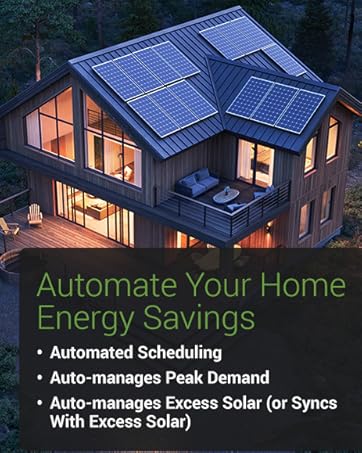
Now, picture an AI-powered, context-aware smart living room where a smart energy dashboard seamlessly orchestrates your environment. Lights adjust automatically to your mood and time of day, the thermostat optimises energy use without your intervention, and every device’s power draw is tracked in real-time, helping you save costs effortlessly.
This transformation from manual control to intelligent automation bridges convenience and efficiency, powered by cutting-edge AI agents that learn, adapt, and optimise your home’s energy use continuously.
TL;DR – What You’ll Get
- A fully automated smart living room that learns and adapts to your lifestyle.
- Automatic adjustment of lights, climate, and media settings for comfort and energy savings.
- Integration using devices such as the Emporia Vue 3 Home Energy Monitor for real-time tracking.
- Setup time of approximately 2–3 hours, with guided steps for easy installation.
Why Build a Context-Aware Living Room?
Building a context-aware living room isn’t just about luxury—it’s about intelligent comfort and efficiency. Such a setup offers:
- Enhanced comfort: AI agents adjust settings based on your presence and preferences, creating a welcoming atmosphere every time.
- Lower energy consumption: Smart energy dashboards enable precise control and insights, reducing wasted power during peak times.
- Less friction: Automation eliminates the need for manual switches and dials, making technology effortless and intuitive.
- Guest-proof convenience: Visitors enjoy the perfect ambience without complicated controls.
- AI-powered luxury feel: Your living room behaves intelligently, learning and adapting to optimise both comfort and savings.
Devices Used in This Smart Living Room Setup
Emporia Vue 3 Home Energy Monitor – Smart Home Automation Module and Real Time Electricity Usage Monitor

The Emporia Vue 3 is the cornerstone of our AI dashboard for home energy management. It accurately tracks whole-home electricity usage in real-time, providing vital plug load reporting system capabilities. Through clamp-on sensors installed in the electrical panel, it helps the smart energy dashboard make informed automation decisions based on actual consumption data.
- UL Listed for safe, reliable operation in residential electrical panels.
- Provides detailed monitoring for whole-home and individual appliance energy use.
- Supports various electrical system types for broad compatibility.
- Integrates with smart home automation platforms to trigger AI-powered routines.
- Real-time electricity data to optimise automations for peak time and energy savings.
How the System Works Together
Picture your evening unfolding with smart AI automation: A motion sensor detects your presence as you enter the living room, triggering a relaxing lighting scene via Philips Hue. The Nest thermostat adjusts the temperature slightly down to save energy while keeping you cosy. Connected smart plugs control secondary devices like lamps and entertainment systems, turning them off automatically when idle. Meanwhile, your Echo Show 8 smart display provides real-time feedback on energy consumption via the smart energy dashboard interface, all powered by AI agents coordinating these devices flawlessly.
Step‑By‑Step Setup
Echo Show
- Unbox and plug in the Echo Show; connect it to your Wi-Fi network.
- Sign in with your Amazon account to enable smart home controls.
- Enable relevant skills/apps for Philips Hue, Nest, and smart plug integrations.
- Set up voice commands for easy routine activation.
Philips Hue
- Install Philips Hue bulbs in your desired living room lighting fixtures.
- Connect the Hue Bridge to your router and sync bulbs with the Hue app.
- Create lighting scenes matching different moods or times.
- Link Hue with Alexa on the Echo Show to enable voice and automation control.
Nest Thermostat
- Replace your existing thermostat with the Nest device, following manufacturer instructions.
- Connect Nest to your home Wi-Fi and Google Home app for control.
- Configure temperature schedules or allow AI-powered AI agents to adjust based on behaviour patterns.
- Link Nest with Echo Show and smart energy dashboard for holistic climate management.
Kasa Plug
- Plug the Kasa smart plug into an outlet, then connect your device (lamp, fan, etc.) to it.
- Use the Kasa app to configure schedules and automation triggers.
- Integrate with Alexa routines on your Echo Show for voice and sensor-driven control.
- Monitor energy usage of connected devices through the AI dashboard if supported.
Aqara Motion Sensor
- Place the sensor in the living room corner with a good vantage point.
- Connect it to your smart home hub or directly to Alexa if compatible.
- Create triggers for motion detection to automate lighting and media routines.
- Adjust sensitivity and timeout durations to reduce false triggers.
Smart Automation Routines to Create
Evening Relax
Trigger: Motion detected in living room after 6 pm.
Actions: Lights dim to warm colour temperature, Nest sets temperature to comfortable level, Echo Show displays relaxing playlist.
Movie Mode
Trigger: Voice command “Alexa, movie time.”
Actions: Lights turn off or shift to ambient blue, smart plugs power the TV and sound system, thermostat adjusts slightly cooler.
Morning Wake‑Up
Trigger: Scheduled time or sunrise detection.
Actions: Gradual brightening of lights, Nest raises temperature, Echo Show provides weather and news briefing.
Away / Energy Saver
Trigger: No motion detected for 30 minutes or manual away mode activation.
Actions: Turn off lights and media devices, reduce thermostat to energy-saving set-point, power down non-essential plugs.
Real Daily Benefits
- Significantly reduced electricity bills by optimising peak time energy use.
- Effortless comfort with AI agents automating lighting and climate adjustments.
- Detailed insights into appliance-specific energy consumption.
- Improved environmental footprint through smarter energy behaviour.
- Simplified control with voice commands and automated routines.
- Visual feedback of consumption patterns via a real-time smart energy dashboard.
Budget vs Premium Paths
There are several tiers for building your smart energy control system based on budget and desired features:
Budget Path
Approximate cost: under $200
- Basic smart plugs and a single motion sensor.
- Manual thermostat with a smart display for basic feedback.
- Limited automation with standard timers and voice commands.
Mid-Range Path
Approximate cost: $200–$600
- Emporia Vue 3 energy monitor for detailed tracking.
- Voice assistant display like Echo Show integrated with Philips Hue and Nest.
- Automations tailored for peak time savings and comfort.
Premium Path
Approximate cost: $600+
- Comprehensive AI dashboard for home energy with plug load reporting system.
- Multiple sensors, smart lighting zones, climate control, and media integration.
- Advanced AI agents continuously optimising for savings and wellbeing.
Real-Life Example
Meet Emma, a busy professional who recently transformed her living room with a smart energy dashboard. Before, she struggled to keep track of rising energy bills and was constantly adjusting her thermostat and lights. After setting up the Emporia Vue 3 Home Energy Monitor and integrating Philips Hue lights, Nest thermostat, smart plugs, and motion sensors, Emma enjoys a living space that adapts to her needs automatically. Her AI-powered system dims the lights when she starts watching TV, subtly lowers the heating during her usual evening reading time, and switches off unused devices to cut costs. Now Emma has peace of mind knowing her smart energy dashboard not only enhances her comfort but saves money by reducing unnecessary energy consumption.
Products Used in This Guide (Quick Reference)
| Product | Role in the System | Best Use | Product Page |
|---|---|---|---|
| Emporia Vue 3 Home Energy Monitor | Real-time whole-home and appliance-level energy tracking | Energy usage monitoring and smart automation triggers | View product → |
Starting your smart energy dashboard journey is easier than you think. Begin with core devices like the Emporia Vue 3 energy monitor and an Echo Show smart display. Gradually add motion sensors, Philips Hue lighting, and smart plugs to expand your AI-powered automation capabilities over time.
Experience the blend of comfort, convenience, and energy savings made possible by intelligent automation. Explore our Emporia Vue 3 monitor to get started today.