


Azure Agent Framework: A Comprehensive Guide to Multi-Agent AI Orchestration and Enterprise Deployment
Azure Agent Framework: Revolutionizing AI with Multi-Agent Orchestration
Estimated reading time: 10 minutes
Key Takeaways
-
- The Azure Agent Framework is an open-source SDK and runtime for building powerful single- and multi-agent AI systems tailored for enterprise and developer use.
-
- It enables multi-agent orchestration with workflows that are sequential, concurrent, or collaborative, supporting complex AI task automation.
-
- Built on open interoperability standards such as OpenAPI, MCP, and A2A, the framework integrates seamlessly with existing tools and APIs.
-
- Developers benefit from local prototyping using Visual Studio Code extensions and scalable, secure deployment via Azure AI Foundry.
- It is designed with enterprise reliability and security in mind, making it suitable for regulated industries.
Table of contents
What Is the Azure Agent Framework?
At its core, the Azure Agent Framework is an open-source engine aimed at creating “agentic” AI apps — intelligent agents that work autonomously or collaboratively to perform complex tasks. These agents range from simple bots to advanced domain-specific AI programs interacting with APIs, databases, and humans.
Microsoft announced the public preview of this framework via Azure’s official blog, highlighting its role as a unifying SDK blending semantic AI and adaptive workflows. Supporting languages like Python and .NET, it lets developers prototype locally before cloud deployment.
Multi-Agent Orchestration: AI Working Together
A standout feature is the framework’s multi-agent orchestration. Unlike traditional AI tools focusing on single-task agents, this framework supports:
-
- Sequential or concurrent workflows, enabling agents to pass tasks in series or execute in parallel
-
- Group chat and debate formats, where agents exchange proposals to achieve optimal solutions
-
- Facilitator/worker models, with agents directing or executing specific tasks
- Long-running workflows featuring state management, context sharing, error handling, retries, and automatic recovery
These capabilities are showcased on Microsoft’s Azure blog announcement and via demonstrations like Microsoft’s YouTube presentation.
Interoperability and Open Standards: The Building Blocks
The framework excels through adherence to open interoperability standards, allowing seamless integration with existing APIs and tools. Key standards include:
| Protocol/Standard | Purpose |
|---|---|
| OpenAPI | Allows importing any REST API as a callable tool by parsing its schema, making APIs instantly usable by agents. |
| Model Context Protocol (MCP) | Enables agents to discover and invoke tools and data servers dynamically without custom coding. |
| Agent-to-Agent (A2A) | Facilitates structured communication and collaboration between agents in different runtimes or environments. |
This extensibility is emphasized in the developer blog and detailed in Holger Imbery’s blog.
Development and Deployment: From Desktop to Cloud at Enterprise Scale
The framework offers a smooth developer experience and enterprise-grade deployment:
-
- Local Prototyping: Use Visual Studio Code extensions for visual authoring, AI Toolkit debugging, DevUI interface, and rapid iteration.
- Cloud Deployment: Deploy with Azure AI Foundry offering observability, durability, compliance, VNet integration, role-based access control (RBAC), and CI/CD via GitHub Actions and Azure DevOps.
Featured in Microsoft’s Azure blog and tutorials like Holger Imbery’s posts.
Enterprise Reliability and Security: Designed for Regulated Industries
For regulated sectors (finance, healthcare, government), trust and compliance are vital. Key framework features include:
-
- Human-in-the-Loop Approvals: Humans oversee critical decision points to ensure accountability.
-
- Telemetry Integration: Connects with Azure Monitor and Application Insights for performance insights.
- Secure Hosting: Supports environments meeting strict regulatory standards.
Described in the Foundry blog and demonstrated in the official YouTube walkthrough.
Powerful Integrations: Connecting the AI Ecosystem
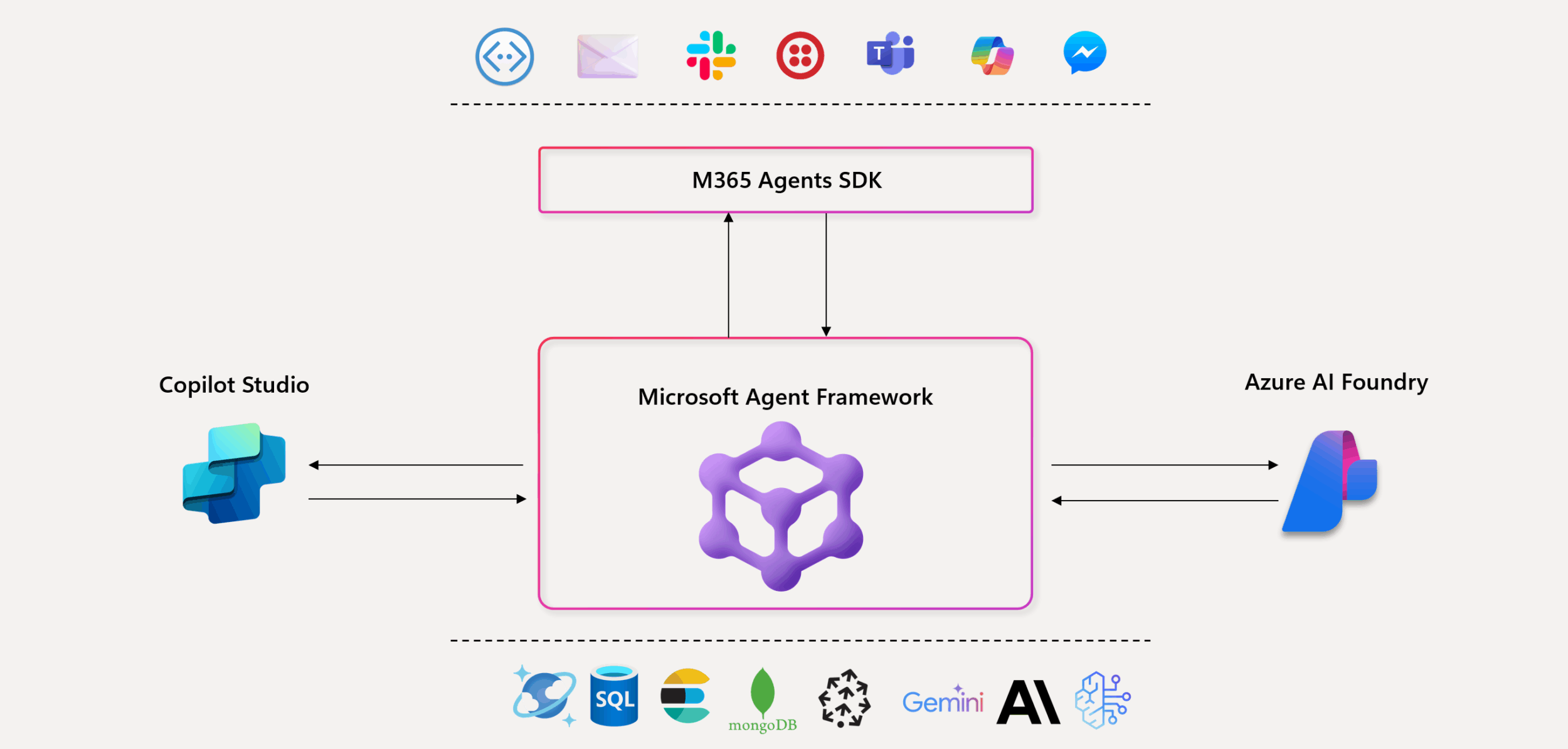
The Azure Agent Framework integrates tightly with Microsoft’s AI and productivity tools, including:
-
- Azure AI Foundry: Hosting and operational management at scale.
-
- Microsoft 365 Copilot and Graph APIs: Agents harness corporate knowledge and productivity workflows.
-
- Copilot Studio: A low-code environment for agent design and customization.
-
- Databases like Redis: High-speed data storage and retrieval.
- Configuration with YAML/JSON: Version-control-friendly files define prompts, roles, tools, and safety guardrails.
Find more on this ecosystem synergy at Holger Imbery’s blog and Nathan Lasnoski’s analysis: How Azure AI Agent Framework accelerates the momentum of digital workers.
Customization and Agent Types: Tailoring AI to Your Needs
Developers can use several built-in agent types for common scenarios or fully customize agents by extending abstract base classes like AgentProtocol and BaseAgent. This offers both ready-made and flexible solutions.
Detailed guidance is available in Microsoft’s official Agent Framework documentation.
Use Cases and Ecosystem: Enabling Real-World AI Applications
The Azure Agent Framework is already proven in practical applications such as:
-
- Customer Onboarding: Multi-agent workflows guide new clients through complex processes efficiently.
-
- Financial Processing: Coordinated agents handle compliance, reconciliation, fraud detection, and approvals.
- Supply Chain Automation: Agents dynamically respond to inventory changes, shipping, and supplier communications.
With seamless local experimentation and unified production deployment, enterprises reduce costly rewrites and tool switching. The stacking of Azure AI Foundry and Copilot Studio supports a wide pro-code/low-code user base.
Background and Future Outlook: A Community-Driven, Open-Source Revolution
Released as a developer-first, community-driven open-source project, the Azure Agent Framework embeds decades of Microsoft Research innovation and modern semantic AI principles.
Announced via Azure’s official channels with customer pilots underway, the framework invites collaboration to create the next generation of AI-powered digital workers, reshaping how humans and machines collaborate.
Conclusion: Why the Azure Agent Framework Matters
The Azure Agent Framework represents a major leap in AI development, combining advanced multi-agent orchestration, open standards, enterprise reliability, and deep Microsoft cloud integration.
For developers and business leaders, it opens new possibilities to build smarter, more adaptive AI systems for supply chain automation, customer engagement, and novel workflows.
As public preview evolves, expect this framework to become foundational in AI’s future, enabling intelligent agent networks across platforms and industries.
Explore the Azure Agent Framework and get started today by visiting the official Microsoft blog here and dive into the open-source project repositories available for Python and .NET developers.
Frequently Asked Questions
The framework supports popular languages including Python and .NET, allowing developers using these ecosystems to build, customize, and deploy AI agents with ease.
By enabling multiple intelligent agents to collaborate in workflows (sequential, parallel, or debate-style), the framework allows AI to tackle complex tasks that single agents alone cannot efficiently manage.
Yes, it includes human-in-the-loop controls, telemetry integration, and secure hosting options that satisfy stringent regulatory and compliance requirements.
Absolutely. Developers can prototype and debug agents locally using Visual Studio Code extensions and AI toolkits, then deploy seamlessly to Azure AI Foundry for enterprise-grade scalability.
Microsoft’s official documentation, developer blogs, and community contributions such as Holger Imbery’s blog are excellent resources.